If you’re new to search engine optimization, understanding SEO content structure is one of the most important foundations you can build. Before backlinks, before advanced keyword research, before technical audits — structure is what makes your content readable, crawlable, and rankable.

In this beginner-friendly guide, you’ll learn how to properly structure an SEO article using simple techniques that work in 2026 and beyond. We’ll keep everything clear, practical, and actionable — no complicated jargon.
By the end of this article, you’ll know exactly how to format blog posts that both readers and search engines can easily understand.
What Is SEO Content Structure?
SEO content structure refers to how you organize your article so that:
- Readers can scan and understand it easily
- Search engines can crawl and index it correctly
- Important topics and keywords are clearly defined
- The content answers search intent directly
Think of structure as the “skeleton” of your article. Without it, even great writing can fail to rank.
Google’s official documentation from Google Search Central emphasizes clarity, organization, and helpful content. Structure directly supports these principles.
Pro Tip: When planning a new article, outline only your H2 and H3 headings first, then fill in the paragraphs later — this keeps your structure tight and prevents rambling.
Why SEO Content Structure Matters
Good structure improves:
- User experience (UX)
- Search visibility
- Featured snippet opportunities
- Voice search optimization
- AI summary extraction
- Local (GEO) discoverability
Search engines prioritize helpful, well-organized content. If your article is messy, overloaded with long paragraphs, or lacks headings, it becomes harder for both users and algorithms to process.
Structured content increases:
All of these are positive signals.
Basic SEO Content Structure Blueprint
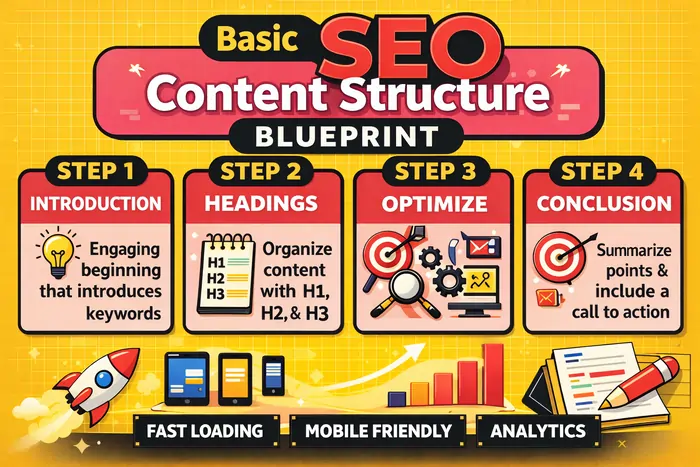
Here is the simple structure every beginner should follow:
- H1 title
- Introduction
- H2 sections
- H3 subsections
- Short paragraphs
- Bullet points
- Internal links
- External authority links
- Clear conclusion
- FAQ section
To make this even clearer for visual learners, include a simple “Good vs. Bad SEO Layout” diagram that shows a well-structured article (single H1, clear H2/H3, bullets) next to a cluttered, text-heavy layout.
Let’s break each one down step-by-step.
1. Use One H1 Title (Your Main Keyword Goes Here)
Every page should have one H1 tag only.
Your H1 is your main title. It tells search engines what the page is about.
Example:
SEO Content Structure for Beginners
Your main keyword should appear naturally in:
Keep the title clear and simple. Avoid keyword stuffing.
Bad example:
SEO Structure SEO Content SEO Guide SEO Tips
Good example:
SEO Content Structure for Beginners: A Complete Guide
If you want more background on titles and headings, the Moz Beginner’s Guide to SEO has a helpful section on titles and headings.
2. Write a Clear Introduction
Your introduction should:
- Explain what the article is about
- Include the primary keyword naturally
- Tell readers what they will learn
This improves AEO (Answer Engine Optimization) because search engines often extract definition-style paragraphs for AI summaries and featured snippets.
A strong introduction answers:
- What is it?
- Why does it matter?
- What will the reader gain?
Keep it 2–4 short paragraphs.
For examples of effective SEO introductions, look at the format used in this SEO overview from Search Engine Land.
3. Use H2 Headings to Break Major Sections
H2 headings organize your main ideas.
Each major topic should have its own H2.
For example:
- What Is SEO Content Structure?
- Why Structure Matters
- How to Format SEO Articles
- Common Mistakes Beginners Make
This improves:
- Readability
- Scanability
- NLP clarity (Natural Language Processing systems understand topics better when clearly separated)
Search engines analyze headings to understand content hierarchy.
You can see good use of headings in this beginner-friendly SEO content structure guide.
4. Use H3 Subheadings for Details
H3 headings break down complex sections into smaller parts.
Example:
How to Format SEO Articles
- Use Short Paragraphs
- Add Bullet Points
- Insert Internal Links
- Optimize Meta Tags
This layered structure helps with:
When information is clearly grouped, it becomes easier for search engines to pull direct answers.
5. Write Short, Clear Paragraphs
Avoid long text blocks.
Best practice:
This improves:
According to usability research from the Nielsen Norman Group, users typically scan web pages instead of reading line by line. Short paragraphs match this behavior and keep readers engaged.
6. Add Keywords Naturally (No Stuffing)
Keyword placement matters — but moderation is key.
Include your main keyword in:
Also include related keywords (LSI keywords) like:
- SEO formatting
- Content layout
- Blog post structure
- On-page SEO
- Content optimization
Tools like the Ahrefs SEO basics guide and the Moz SEO Learning Center offer beginner-friendly keyword research tutorials.
Natural keyword usage helps NLP systems understand context without over-optimization penalties.
7. Use Bullet Points and Lists
Lists improve:
Search engines often pull numbered steps into “How-To” snippets.
Example:
Steps to Structure an SEO Article:
- Choose your main keyword
- Write a clear H1 title
- Add structured H2 sections
- Keep paragraphs short
- Add internal links
Clear formatting increases AEO performance and makes your content easier to skim.
8. Add Internal Links
Internal links connect related pages on your website.
They help:
Example (replace with your own URLs):
- Link “keyword research guide” to your pillar page, e.g.,
/keyword-research-guide/ - Link “on-page SEO basics” to
/on-page-seo-basics/ - Link “meta tag optimization” to
/meta-tags-seo/
Pro Tip: Before publishing, audit your draft and make sure every major concept (keyword research, on-page SEO, meta tags, content briefs) points to a relevant pillar or supporting article on your site. This creates a strong internal content hub.
Internal linking builds topical relevance and supports your overall site architecture.
9. Add External Authority Links
Linking to trusted sources increases credibility (E-E-A-T: Experience, Expertise, Authoritativeness, Trustworthiness).
Examples of trusted SEO resources:
- Google Search Central documentation
- Moz Beginner’s Guide to SEO
- HubSpot SEO resources and partner explainers like this HubSpot SEO recommendations guide
- Search Engine Journal’s coverage of Google SEO documentation and trends
External links signal that your content is well-researched and trustworthy.
10. Optimize Your Meta Title and Description
Meta title:
Meta description:
Example:
Meta Title:
SEO Content Structure for Beginners
Meta Description:
Learn how to structure SEO content properly using headings, keywords, and formatting techniques that improve rankings and readability.
You can study examples of strong titles and descriptions in the Google SEO Starter Guide.
11. Include a Simple FAQ Section
FAQ sections help with:
Example:
Frequently Asked Questions
What is SEO content structure?
SEO content structure is the way an article is organized using headings, paragraphs, keywords, and formatting to improve readability and search rankings.
How many headings should I use?
Use one H1, multiple H2s, and H3s when needed for subtopics.
FAQs support AEO by providing direct, clear answers.
12. Basic GEO Optimization (Location Signals)
If your business serves a location, include:
Example:
“SEO Content Structure for Small Businesses in Manila”
This helps local search visibility. Google explains local ranking factors in their Google Business Profile help documentation.
13. Make Content Helpful (Helpful Content Principle)
Google prioritizes helpful, people-first content.
Ask yourself:
- Does this answer a real question?
- Is it easy to understand?
- Is it beginner-friendly?
- Does it solve a problem?
Avoid fluff and filler. Clear structure supports helpfulness and aligns with the SEO Starter Guide’s focus on useful, original content.
14. Common SEO Structure Mistakes Beginners Make
Avoid these:
- ❌ Multiple H1 tags
- ❌ No headings at all
- ❌ Long 10-line paragraphs
- ❌ Keyword stuffing
- ❌ No internal links
- ❌ No meta description
- ❌ No conclusion
From experience, many beginners fix only keywords and forget structure, but simply improving headings, paragraphs, and links can lead to noticeable ranking and engagement gains.
15. Example of a Simple SEO Article Layout
Here’s a basic template you can copy:
- H1: Main Title
- Introduction (2–3 paragraphs)
- H2: What Is [Topic]?
- Explanation
- H2: Why It Matters
- Explanation
- H2: How to Do It
- H3: Step 1
- H3: Step 2
- H3: Step 3
- H2: Common Mistakes
- H2: FAQ
- Conclusion
To reinforce this, you can pair the template with a simple “good vs. bad” mockup: one side showing clear sections and bullet points, the other side showing one giant, unstructured block of text.
How SEO Structure Supports AI Search (AEO)

Even beginners benefit from AI-friendly formatting.
AI systems extract:
Clear structure increases your chance of appearing in:
This is why clarity matters more than complexity.
SEO Content Structure Checklist for Beginners
Before publishing, review this checklist:
- ✔ One H1 only
- ✔ Clear introduction
- ✔ Organized H2 sections
- ✔ H3 for detailed steps
- ✔ Short paragraphs
- ✔ Natural keyword usage
- ✔ Bullet lists
- ✔ Internal links (to your pillars and clusters)
- ✔ External authority links
- ✔ Optimized meta title
- ✔ Meta description
- ✔ FAQ section
- ✔ Clear conclusion
If all are checked, your structure is strong.
Final Thoughts: Keep It Simple
SEO content structure does not need to be complicated.
For beginners, focus on:
Structure is the foundation of SEO success. Before you worry about advanced strategies, make sure your content is:
If you consistently apply this simple structure to every article — and support it with visuals, smart internal links, and your own experience — you’ll build strong SEO habits that support long-term growth.