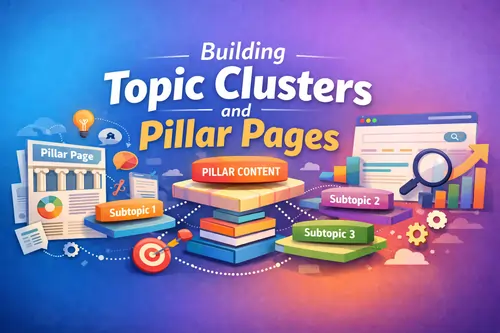
If you want steady organic growth in 2026, you can’t rely on random “one-off” blog posts anymore. Search engines (and AI answers) reward websites that show topical relevance, strong information architecture, and clear site architecture. That’s exactly what topic clusters and pillar pages are built for: a system that organizes content into a hub-and-spoke model, strengthens your internal linking strategy, and helps you build topical authority over time.
This guide is simple, practical, and structured for SEO, AEO (answer engine optimization), and GEO (generative engine optimization).
What are topic clusters?
A topic cluster model (also called content clusters, content hub, or hub page approach) is a set of interlinked pages focused on one subject:
- A pillar page (the main “hub”) covers the topic broadly.
- Cluster content (also called cluster pages or child pages) covers subtopics in depth.
- Everything is connected with contextual links and a clear internal link structure.
This is different from publishing posts like “SEO Tips #1… #2…” without a plan. Clusters give your website a readable content hierarchy and a healthier crawl path for search engines.
What is a pillar page?
A pillar page (often called pillar content, cornerstone content, or a cornerstone page) is a comprehensive page that introduces a broad topic and links out to supporting articles. It’s designed to satisfy multiple intents, then route readers to deeper pages based on their needs.
Think of it like a “table of contents” plus the most important explanations—then each cluster post expands one section.
Topic clusters vs content silos
People often compare topic clusters vs content silos (or silo structure). Both aim to organize content, but:
- Content silo structures often rely on strict category boundaries and navigation.
- Topic clusters rely heavily on contextual internal linking, where pages naturally reference each other based on meaning (semantic relationships).
You can still use categories and tags (e.g., WordPress taxonomy), but don’t confuse “category pages” with a true pillar page. Your pillar is a curated, intentional resource—not just an archive.
Why topic clusters improve SEO
1) Better crawlability and indexation
Clusters reduce orphan pages and improve crawlability because Google can discover related pages faster through links. It can also help with indexation consistency (pages are easier to find and re-crawl).
2) Stronger internal PageRank flow
A good cluster distributes link equity across your site. If some posts get backlinks, internal links help pass value to important pages like your pillar or commercial pages.
3) Less keyword cannibalization
With keyword mapping and clear roles (pillar vs cluster), you reduce keyword cannibalization—where multiple pages compete for the same query because of overlapping intent.
4) Clearer topical authority signals
Clusters help demonstrate topical relevance and depth. This supports EEAT signals indirectly, especially in sensitive niches where trust matters (health, finance, etc.).
5) More “answer-ready” content
When your pillar defines concepts clearly and your cluster posts answer specific questions, you’re more likely to win “People Also Ask”-style queries and quick answers. (Even if SERP layouts change, the content structure stays useful.)
6) Better performance in AI answers
AI systems prefer content that is:
- well-structured,
- entity-rich (clear concepts, names, definitions),
- internally consistent, and
- easy to cite.
Topic clusters make your site easier to interpret as one cohesive “knowledge set.”
How to choose the right pillar page topic
A pillar topic should be:
- Broad enough to generate many subtopics (supporting articles)
- Evergreen enough to justify updates (good for content refresh)
- Clearly connected to your niche or offer (so it converts)
Use these checks:
- Search intent mapping
Look at the SERP and ask: Is the main intent informational, commercial, or mixed? A pillar often targets mixed intent and then routes to child pages. - Parent topic vs child pages
Your pillar is the parent topic. Each cluster post should be a distinct question, method, or sub-area that can stand alone. - Avoid “too narrow” pillars
“Internal links for SEO” can be a pillar. But “How to add two internal links in WordPress” is too narrow.
Keyword research for topic clusters
Step 1: Start with a core keyword
Example: topic clusters and pillar pages (your focus keyword)
Step 2: Expand using query expansion + SERP analysis
Gather terms and questions via:
- search suggestions,
- related searches,
- People Also Ask,
- competitor pages.
This is your query expansion stage. It produces both secondary keywords and supporting keywords.
Step 3: Do keyword clustering
This is where you organize terms into themes. You can do it manually or via tools, but the goal is the same: create a clean keyword map.
Common buckets you’ll naturally create:
- Definitions (what is a pillar page, what is a topic cluster)
- Implementation (how to build topic clusters)
- Internal linking (anchor text, click depth, orphan pages)
- Maintenance (content consolidation, content pruning, content refresh)
- Comparisons (topic clusters vs content silos)
This is also the foundation for your content plan and content mapping.
Step-by-step: How to build topic clusters and pillar pages
Step 1 — Define your core topic and scope
Decide exactly what your pillar covers, and what it does not cover.
Quick test:
- If your outline becomes 8,000 words and still feels incomplete, your scope is too broad.
- If you can’t identify at least 8–15 cluster posts, your scope is too narrow.
Also, confirm you can write “content coverage” that matches what searchers expect. In SEO terms: you want depth without fluff.
Step 2 — Create the pillar page
Your pillar should feel like a helpful guide and navigation system. Recommended sections:
- A simple definition (AEO-friendly)
- A short “how it works”
- A table of contents
- Clear subsections that introduce each subtopic
- Links to cluster pages (and later, a “related posts section”)
On-page SEO for the pillar page
- Use your primary keyword in H1 + intro
- Add secondary keywords in H2/H3 naturally
- Keep formatting skimmable (great for NLP extraction): short paragraphs, bullets, mini summaries
Avoid thin content
Even if you’re linking out, don’t make the pillar just a list of links. It still needs real value (examples, frameworks, templates).
Step 3 — Create supporting cluster content
Each cluster page should focus on one narrow intent. This is where long-tail keywords shine.
Examples of cluster angles:
- “topic cluster examples”
- “pillar page examples”
- “how many cluster pages per pillar”
- “anchor text optimization”
- “fix orphan pages”
- “content consolidation vs content pruning”
Prevent duplicate content and overlap
If two cluster posts answer the same question, you create internal duplicate content risk and cannibalization. Solve this by:
- picking one “primary” page per intent,
- merging overlap via content consolidation,
- using canonical tags only when truly needed (more below).
Step 4 — Build the internal linking structure
A cluster fails if linking is weak. The minimum viable structure:
- Pillar → links to every cluster page
- Every cluster page → links back to the pillar page
- Cluster → cluster cross-links only when it improves understanding (don’t force it)
This is your internal link audit checklist later.
Contextual vs navigational links
- Navigational links: menu, footer, category pages
- Contextual links: links inside sentences and paragraphs (often most powerful)
Aim to prioritize contextual links, because they carry meaning.
Anchor text best practices
Use descriptive anchors (not “click here”). Keep it natural and varied. This supports anchor text optimization without looking spammy.
Click depth
Try to keep key cluster pages within a reasonable click depth (not buried 6 clicks away). Pillars help reduce depth by acting as central hubs.
Internal linking best practices for clusters
Use these rules to keep your internal links clean:
- Link where it adds value (not just for SEO)
- Avoid stuffing too many links in one paragraph
- Fix broken links regularly
- Watch for orphan pages
- Ensure a clean crawl path from pillar → cluster → related cluster
If you want a deeper internal linking reference, Backlinko’s internal linking guide is a solid starting point. Link: internal linking best practices.
Common topic cluster mistakes to avoid
1) Publishing clusters without updating the pillar
Your pillar should evolve. When you publish a new cluster page, add it to the pillar and improve the table of contents.
2) Treating categories as pillars
WordPress category pages are rarely “pillar-ready” because they’re not curated, don’t explain concepts, and can become messy.
3) Keyword cannibalization from poor keyword mapping
If you write:
- “Topic cluster strategy”
- “How to build topic clusters”
- “Topic clusters SEO”
…and they all target the same intent, you’ll cannibalize.
4) Orphan pages
If a cluster post isn’t linked from your pillar (and not linked elsewhere), it becomes harder to crawl and rank.
5) Internal linking that’s too rigid or too random
You want a planned structure, but still natural. Think “helpful pathways,” not forced cross-linking.
Technical SEO considerations
You don’t need to be a developer, but these topics matter:
URL structure
Keep pillar URLs short and stable (e.g., /topic-clusters/), and cluster URLs clearly related (e.g., /topic-clusters/internal-linking/).
Canonical errors
If you have near-identical pages, you can create canonical confusion. Canonicals help, but the best fix is usually content consolidation and clearer intent.
XML sitemaps and robots.txt
Make sure your pillar and cluster pages are indexable (no accidental noindex) and present in your sitemap. Your robots.txt shouldn’t block important sections.
Crawl budget
For large sites, crawl budget becomes a real topic. Clusters can help by making important pages easier to rediscover and re-crawl through internal links. (For smaller blogs, don’t obsess over this.)
Topic cluster examples
Example 1: SEO topic cluster
Pillar page: “On-Page SEO: The Complete Guide”
Cluster pages:
- Title tag formulas
- Meta descriptions that improve CTR
- Header structure (H1/H2/H3)
- Image SEO (alt text, compression)
- Internal linking strategy
- Keyword cannibalization fixes
Example 2: Local business cluster
Pillar page: “Local SEO for PH Businesses”
Cluster pages:
- Google Business Profile setup
- Getting reviews ethically
- Local citations for PH directories
- Location landing pages
- “Near me” keyword research
Example 3: E-commerce cluster
Pillar page: “E-commerce SEO Strategy”
Cluster pages:
- Category vs product page SEO
- Faceted navigation
- Schema basics
- Duplicate content in product descriptions
- Internal linking for category depth
Measuring success
Track progress at the cluster level:
- Ranking improvements for cluster keywords
- Pillar page impressions and clicks
- Internal links count and coverage (did you reduce orphan pages?)
- Indexation stability (are important pages consistently indexed?)
- Engagement (time on page, scroll depth)
If you want an industry walkthrough for building topic clusters, Semrush has a newer guide you can reference here: topic clusters for SEO.
GEO: How to make your cluster content “AI-citable”
To improve visibility in AI-driven answers:
- Put definitions early (“What is a pillar page?”)
- Use clear headings and bullet lists (NLP-friendly)
- Add entity-rich terms naturally (e.g., internal links, crawlability, canonical tags)
- Include short summaries (“Key takeaways”) after major sections
- Keep claims grounded and avoid exaggerated promises
A helpful overview of how topic clusters are defined and structured is also covered by Ahrefs: topic cluster model.
FAQs
How many cluster pages should one pillar have?
Start with 8–15 high-quality cluster pages. More is fine if each page targets a unique intent and adds real value.
Can one page belong to multiple clusters?
Yes, but be careful. If one page supports two pillars, link it from both and keep the primary intent clear.
How long does it take to see results?
If your site is new, expect weeks to months. You’ll often see early gains in indexing and internal link flow first, then rankings later.
Do topic clusters work for small blogs?
Yes—small blogs benefit because clusters reduce randomness and make growth more systematic.