Ever looked at google.com what is a TLD or wikipedia.org and wondered about that bit after the dot? That’s a TLD (your Top-Level Domain), and it matters way more than most people realize.
A Top-Level Domain is the last part of any domain name. Everything after the final dot. Wikipedia explains that TLDs sit at the highest level in the internet’s Domain Name System, right after the root domain. Look at seomafiaclub.com. The .com part is the TLD.
I’ve spent 18 years working with every type of domain extension you can imagine. When I started, we had maybe a dozen options. Today? Over 1,500 different TLDs exist. Knowing how they work isn’t optional anymore if you’re serious about building an online presence.

Here’s something I learned the hard way:
we originally launched with seomafia.expert, thinking the .expert extension would reinforce our authority positioning. The site struggled with Google indexation for weeks.
After switching to seomafiaclub.com, our pages indexed within days. That real-world experience taught me more about TLD selection than any case study ever could.
Table of Contents
How TLDs Actually Work Behind the Scenes
Cloudflare breaks down the DNS hierarchy pretty well. Think of TLDs as the first checkpoint your browser hits after leaving the starting gate. Type a web address and watch what happens next.
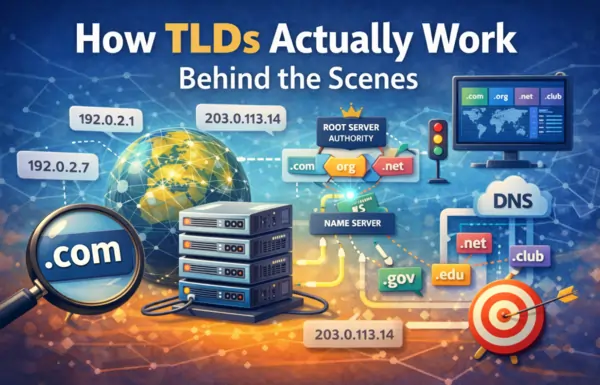
What Happens When You Visit a Website
Your browser contacts a root nameserver first. This is the internet’s master directory, managing every domain on the planet.
The root server points you to a TLD nameserver. Different servers handle different extensions. One manages all .com sites, another handles .org, and so on.
You get directed to the right authoritative server. This server knows exactly where your specific domain lives.
Finally, you receive the IP address and your browser connects to load the website.
This whole dance happens faster than you can blink. Understanding these mechanics helps explain why your TLD choice affects both technical performance and how people perceive your site.
Why TLDs Matter for Your Website
Beyond keeping the internet’s plumbing running smoothly, TLDs do real work for your business in three key ways.
Website Categorization and Purpose
Research from Wix shows people make instant judgments based on domain extensions. See a .edu? Educational institution. Spot a .gov? Government site. Notice a .shop? Someone’s selling something.
This split-second recognition influences whether people click your link in search results or scroll past it.
Geographic Targeting and Local Relevance
Country-code TLDs communicate geographic focus to both visitors and search engines. A .uk domain screams “we’re British,” while .de says “German company here.”
Businesses targeting specific countries benefit from the local credibility these extensions provide. For more on how geographic TLDs impact local SEO performance, check out the complete guide to TLDs and SEO rankings.
Brand Identity and Memorability
Your TLD becomes inseparable from how people see your brand. The .com extension brings instant credibility and global recognition. Extensions like .ai or .io signal tech innovation. A .studio domain tells visitors you’re in the creative business before they even land on your homepage.
When we switched from seomafia.expert to seomafiaclub.com, we didn’t just solve our indexation problems. We also noticed people found it easier to remember and type our domain correctly. The .com extension carries familiarity that newer TLDs simply can’t match yet.
The Three Main Types of TLDs
Purely Website identifies three main TLD types worth understanding if you own or plan to launch a website.
Generic Top-Level Domains (gTLDs)
These are the extensions everyone recognizes. Semrush defines them as domain endings anyone can register regardless of where they live or what they do.
The classics include:
- .com (commercial): Started for businesses, now used by everyone
- .org (organization): Originally meant for nonprofits, but anyone can grab one
- .net (network): Began with networking companies, now general-purpose
- .edu (education): Actually restricted to accredited schools
- .gov (government): U.S. government only
Most gTLDs have no restrictions, which is why ICANN lets private companies manage them. Anyone with a credit card can register most of these extensions.
Why does .com dominate despite hundreds of alternatives? It still represents about 46% of every registered domain worldwide. People trust it. People remember it. People type it automatically. Our experience with seomafia.expert versus seomafiaclub.com proved this. Users would often default to typing .com even when they’d seen our .expert address.
Country Code Top-Level Domains (ccTLDs)
These two-letter codes designate specific countries. They’re based on international country codes, with each nation getting its own identifier.
Common examples include:
- .uk: United Kingdom
- .de: Germany (short for Deutschland)
- .ca: Canada
- .jp: Japan
- .fr: France
- .au: Australia
By mid-2025, people had registered 143.4 million ccTLD domains globally. That’s a lot of country-specific sites still thriving in our supposedly borderless internet.
Tech startups love the .io extension (technically the British Indian Ocean Territory), while AI companies flock to .ai (Anguilla’s country code). Geography matters less than branding for these cases.
For a detailed comparison of how ccTLDs perform versus gTLDs in search rankings, read the comprehensive TLD analysis.
New Generic Top-Level Domains (New gTLDs)
ICANN opened the floodgates in 2013, and suddenly we went from a handful of extensions to over a thousand new options.
The categories break down like this:
Industry-focused extensions include .tech, .finance, .law, .shop, .store, and .studio.
City and region options cover .nyc, .london, .tokyo, and .berlin.
Descriptive extensions offer .blog, .news, .app, .online, and .site.
Just-for-fun options include .guru, .ninja, .rocks, .club, and .fun.
Back in 2011, ICANN received 1,930 applications from companies wanting to operate their own TLDs. That’s when things got interesting.
Major corporations now run private TLDs. Google owns .google, Amazon controls .amazon, and Apple runs .apple. These brand TLDs stay exclusive to the companies that created them.
The .expert extension we initially chose falls into this new gTLD category. While it looked great on paper and seemed to position our brand perfectly, the practical reality was different. Google struggled to crawl and index our content efficiently on that newer extension.
Special TLD Categories You Should Know
Beyond the big three categories, a few specialized TLD groups serve specific purposes.
Sponsored TLDs (sTLDs)
These extensions come with strings attached. You need to qualify before registering:
- .edu: U.S. accredited educational institutions only
- .gov: U.S. government agencies exclusively
- .mil: U.S. military branches
- .museum: Museums and related cultural organizations
The registration restrictions automatically boost trust. You can’t fake a .edu domain.
Infrastructure TLDs
Technical domains keep the internet running smoothly. The .arpa extension handles reverse DNS lookups and other behind-the-scenes internet infrastructure.
Special Use TLDs
These exist for testing and documentation only:
- .test: Reserved for testing environments
- .example: Used in technical documentation
- .localhost: Local development work
- .invalid: Guaranteed never to resolve to a real website
You can’t register these for actual websites. They serve purely technical functions.
How to Choose the Right TLD Type
Your choice between gTLD, ccTLD, or new gTLD depends entirely on who you’re trying to reach and what you’re trying to accomplish.
When to Use Generic TLDs
You should pick a gTLD if your audience spans multiple countries, you’re building a global brand, maximum trust and familiarity matter most, or international expansion is in your future.
The .com extension remains the safest bet for most businesses. Everyone knows it. Everyone trusts it. After our experience with indexation delays on seomafia.expert, switching to seomafiaclub.com eliminated technical friction and accelerated our growth.
When to Use Country Code TLDs
A ccTLD makes sense if you only serve one country, local customers strongly prefer domestic domains, your competition is purely local, or you need to show commitment to a specific market.
Research confirms ccTLDs work best when you’re focused on a single country where local domain preference runs strong.
When to Use New TLDs
New gTLDs work well if someone already owns your .com, your industry has a perfect matching extension (.tech, .studio, .shop), immediate category clarity helps your positioning, or you’re targeting tech-savvy audiences familiar with newer options.
The specificity of new gTLDs can actually help in niche industries where instant category recognition matters.
However, be prepared for potential indexation challenges. Our struggle with seomafia.expert wasn’t unique. Newer TLDs sometimes face crawl budget limitations and trust issues with search engines that established extensions don’t encounter.
To understand which TLD type performs best for SEO in different scenarios, explore the detailed TLD impact analysis.
Common TLD Myths and Misconceptions
Eighteen years in this business, and I still hear the same misconceptions repeatedly.
Myth: All Two-Letter Extensions Are Country Codes
Not quite. While most two-letter TLDs represent countries, the way people actually use them has gotten messy.
Tech companies worldwide use .io and .ai for branding despite these being country codes. The line between geographic and generic has blurred significantly.
Myth: Your TLD Determines Website Quality
Wrong.
The extension itself means nothing for quality. Yes, it hints at purpose or positioning, but content, user experience, and actual value determine whether a site is worth visiting.
A terrible site on .com underperforms a well-optimized site on any other extension every single time.
Myth: You’re Stuck with One TLD
Nope.
Smart businesses register multiple TLDs. Your main domain plus common misspellings and alternative extensions. This protects your brand and stops competitors from hijacking your traffic.
We still own seomafia.expert and redirect it to seomafiaclub.com. That defensive registration prevents confusion and captures anyone who remembers our old domain.
Myth: New TLDs Get Penalized by Google
False (sort of).
Google’s algorithm doesn’t actively penalize new TLDs in rankings. However, newer extensions can face practical challenges with crawl budget allocation, user trust signals, and indexation speed.
Our seomafia.expert experience illustrated this perfectly. We weren’t penalized, but we also weren’t getting crawled and indexed efficiently. The switch to .com solved those problems immediately.
For proof of how Google actually treats different TLDs in search results, see the complete research on TLDs and SEO rankings.
TLD Length and Character Limits
Most TLDs run between 2 and 6 letters, though technically they can stretch to 63 characters (nobody does this).
Typical lengths break down like this:
Two-character TLDs are country codes like
- .uk,
- .de
- .jp
- .ph
Three-character TLDs include classic generics like
- .com
- .org
- .net.
Four-or-more-character TLDs cover newer options like .shop, .tech, .studio, and .marketing.
Shorter TLDs win on memorability and ease of typing. This explains .com’s continued dominance despite thousands of alternatives.
Understanding Domain Structure and TLD Placement
Here’s the key distinction: your domain name is the complete address (seomafiaclub.com), while your TLD is just the extension piece (.com).
Breaking down the structure shows three main components:
- The subdomain (like blog) is optional and comes first.
- The second-level domain (seomafiaclub) is what you actually register and own.
- The top-level domain (.com) is what you choose from available options managed by registries.
Put them together and you get blog.seomafiaclub.com. That’s your Fully Qualified Domain Name.
You pick and register the second-level domain. The TLD is what you select from registries that manage different extensions.
How TLD Management and Registration Works
ICANN runs the show through the Internet Assigned Numbers Authority, maintaining the DNS root zone that makes everything work.
Here’s the hierarchy from top to bottom:
ICANN sets the rules and coordinates the entire global domain system.
Registry operators are companies managing specific TLDs. VeriSign handles .com and .net, for example.
Registrars are the middlemen selling domain registrations to regular people, like Namecheap, GoDaddy, and Name.com.
Registrants are you, the website owner who actually uses the domain.
When you buy a domain, you’re really leasing it from the registry through a registrar for one to ten years at a time.
TLDs and SEO: What Actually Matters
The relationship between domain extensions and search rankings is way more subtle than most people think.
Direct Ranking Impact
Google confirmed years ago that TLDs aren’t a ranking factor. Their algorithm treats .com, .org, .shop, and other gTLDs identically when calculating where pages should rank.
Indirect SEO Effects That Matter
TLDs influence rankings through how people behave. Whether they click your result in search, if they trust your site enough to stay, how easily they remember and return, and whether other sites want to link to you all get affected by your TLD choice.
But there’s another indirect effect many people overlook: indexation speed and crawl efficiency. Our switch from seomafia.expert to seomafiaclub.com didn’t change our rankings directly, but getting indexed faster meant we could compete for rankings sooner. That head start compounds over time.
Geographic Targeting Considerations
Country-code TLDs used to provide real SEO benefits for local search, but this advantage keeps shrinking as Google’s algorithm gets smarter about understanding location through other signals.
Want the complete breakdown of how each TLD type affects your search visibility, including case studies and data?
Read the full guide: TLDs Explained: How Domain Extensions Affect SEO Rankings.
Key Takeaways About TLDs
Now that you understand how TLDs work, here are the points worth keeping in mind:
TLDs are just the extension. That’s the part after the final dot in any web address.
3 main types exist:
- generic (gTLDs) work globally
- country codes (ccTLDs) target specific nations
- and new gTLDs offer niche options.
Business goals trump SEO games. Pick your TLD based on who you’re serving and what you’re building, not mythical ranking advantages.
Perception shapes performance. How your audience views your extension affects trust, clicks, and ultimately whether they become customers.
Technical considerations matter. Our real-world experience shows that established extensions like .com often index faster and crawl more efficiently than newer alternatives.
.com still rules despite 1,500+ alternatives. It maintains dominance through universal recognition, ingrained trust, and proven technical reliability.
Context determines the right choice. Global brands lean toward gTLDs, local businesses benefit from ccTLDs, and niche operations can leverage new gTLDs effectively (but always test and monitor performance).
Getting TLDs right is just the foundation. The next challenge is combining the right extension with a memorable, brandable domain name that actually drives business growth. For strategic guidance on TLD selection and how different extensions impact your overall SEO performance, dive into the comprehensive TLD and SEO analysis.
More SEO Insights from Jin Grey
On Domain Strategy:
- TLDs Explained: How Domain Extensions Affect SEO Rankings – Complete analysis of gTLDs, ccTLDs, and new domain extensions with data-backed insights on how each type impacts search performance