Why Internal Linking Still Wins in 2026
In 2026, competition for organic visibility is stronger than ever, but most sites still underuse internal links. Smart internal linking lets you squeeze more value out of content you already have by making it easier for search engines to crawl, understand, and rank it. At the same time, a well‑planned internal linking strategy improves user experience by helping visitors move naturally from one useful page to the next instead of bouncing after a single view.
Instead of treating internal links as an afterthought, think of them as the connective tissue of your entire website. Done right, internal links create clear paths between related topics, highlight your most important pages, and support both traditional SEO and answer‑engine optimization (AEO).
This guide shows you how to design a smart internal linking framework built on content hubs, topic clusters, and breadcrumb navigation that works for blogs, affiliate sites, ecommerce, and local businesses in any region.
What Is Smart Internal Linking?
Smart internal linking is a deliberate way of connecting your pages so that both users and search engines can clearly see your site’s structure, your most important URLs, and how your topics relate to one another.
Instead of dropping random links wherever they fit, you design a smart internal linking strategy that uses content hubs, topic clusters, and breadcrumb navigation to create intentional paths across your site.
The goal is to support rankings, improve user experience, and help answer engines quickly identify which pages are the best answers for specific questions.
This approach is different from old‑school “link everything to everything” tactics. Smart internal linking respects intent, context, and hierarchy. Each link is there because it helps someone continue their journey or helps search systems better interpret a page.
Over time, this kind of structure builds topical authority around your key themes and makes your content ecosystem stronger with every new URL you publish.
For a solid conceptual refresher, you can compare your approach to guides like Yoast’s internal linking for SEO and Semrush’s Internal Links: Ultimate Guide + Strategies.
Internal Linking Basics (Quick Refresher)
Internal links are hyperlinks that connect one page on your site to another page on the same domain. You can think of them as roads within a city: they dictate how easy it is to move from one place to another and which areas feel central or important.
The main types of internal links include:
- Navigational internal links in your header, footer, and menus that define your primary sections.
- Contextual internal links inside the body of your content that point to closely related pages and resources.
- Breadcrumb navigation links that show a hierarchical path from your homepage down to the current page.
- Utility links in sidebars, related posts blocks, and “popular posts” or “related products” sections.
The primary goals of internal links for rankings are straightforward: guide users, clarify hierarchy, and distribute link equity internally to your most important URLs. When you plan your internal link structure with these goals in mind, you make it easier for search engines to interpret which pages are pillars, which are supporting assets, and where authority should flow.
If you want a checklist‑style overview of these basics, the Google Search Central Link best practices page is a must‑read.
The 2026 Internal Linking Framework
Modern search systems increasingly reward sites that demonstrate clear topical clusters and logical architecture. Flat or chaotic structures make it hard for algorithms and users to see how content relates, which can limit your visibility even if the content itself is good.
A simple, effective framework for 2026 rests on three pillars:
- Content hubs as your authority centers for each major topic.
- Topic clusters as the deeper, more focused articles that live under each hub.
- Breadcrumb navigation as a lightweight but powerful way to express hierarchy on every page.
Together, these elements form an internal linking site architecture that is easy to crawl, easy to understand, and easy to expand. Whenever you add new content, you already know which hub it belongs to, which cluster it supports, and where to plug it into your existing internal linking structure.
For more background on the hub‑and‑cluster model, see Conductor’s topic cluster and pillar page guide or SEOZoom’s topic cluster framework.
Content Hubs: Building Your Authority Centers
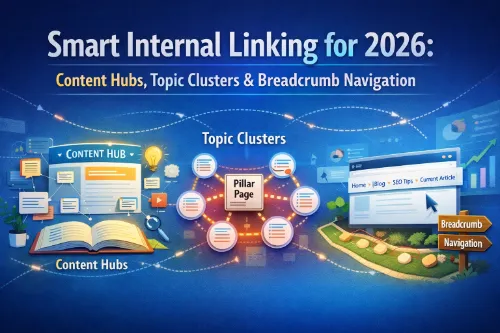
Content hubs are high‑level pages that cover a broad topic and act as authority centers within your site. They are often pillar pages or “ultimate guides” that give a comprehensive overview of a subject and then link out to more detailed cluster articles.
A strong content hub typically:
- Targets a broad but clearly defined topic that matters to your business.
- Offers a thorough overview that helps users understand the landscape.
- Contains multiple contextual internal links pointing to cluster pages that go into specific subtopics.
- Receives internal links from related content across the site, consolidating authority.
For example, on a travel site, “Philippines Travel Guide 2026” might serve as a hub. That page can link to cluster articles like “Cebu 5‑Day Itinerary,” “Palawan Island Hopping Packages,” “Bohol Countryside Tour Guide,” and “Best Hotels in Manila.” Each of those cluster pages links back to the main hub, forming a clear pillar page and cluster model.
The same idea works in other niches: an Internal Linking Strategy Guide can act as a hub for an SEO site, while “Running Shoes” can be a hub for an ecommerce store. The key is that internal linking content hubs anchor an entire topic, and every related page connects through them so your structure feels intentional rather than random.
Topic Clusters: Structuring Depth Around Each Hub
Topic clusters are groups of tightly related pages that live under a single hub or pillar page. Each cluster article focuses on a specific angle or question within the broader topic and links up to the hub for context.
A typical topic clusters internal linking pattern looks like this:
- The pillar page links to each cluster article, usually via descriptive anchor text within the content and sometimes through a table of contents or “Further reading” section.
- Each cluster article links back to the pillar page using natural, relevant anchors.
- Cluster articles link laterally to each other where it makes sense, so users can move between closely related topics without having to return to the hub every time.
This setup builds internal linking for topical authority because it shows that you cover a topic in depth rather than in isolation. For answer engines and voice search, it also provides a rich network of semantically related documents, making it easier for systems to pull precise answers from the right page.
When you plan topic clusters, think in terms of user journeys. For a hub on “Internal Linking for SEO,” your clusters might include “Internal Linking Best Practices,” “Internal Link Structure Examples,” “Contextual Internal Links vs Navigational Internal Links,” and “Internal Links for Rankings: Quick Wins.” Each of these supports the broader hub while addressing a distinct need or question.
Breadcrumb Navigation: Invisible Architecture That Scales
Breadcrumbs are a row of links, usually near the top of a page, that show the path from your homepage to the current URL. They might look like:
Home › Blog › SEO › Internal Linking › Smart Internal Linking for 2026
Although they take up very little space, breadcrumb navigation delivers an outsized impact:
- It makes your site’s hierarchy visible and intuitive, especially on large sites with multiple levels.
- It reduces crawl depth by providing search engines with additional paths to reach deeper pages.
- It reinforces your internal linking structure with consistent, descriptive anchor text across the site.
From an SEO point of view, breadcrumb navigation SEO is still a best practice. From a UX angle, breadcrumbs help users understand where they are, how to move up a level, and how the current page fits into the bigger picture. In terms of AEO, a clear trail of breadcrumbs helps systems map your entities and categories more accurately.
Implement breadcrumbs so that they reflect your real structure, not just arbitrary labels. For deeper best practices and examples, you can refer to SE Ranking’s breadcrumb navigation guide or Quattr’s complete breadcrumb navigation guide.
Designing a Smart Internal Linking Map
Before you start adding new links, you need a clear picture of how your current internal linking strategy looks. This is where mapping and auditing come in.
First, inventory your content:
- Identify your existing pillar pages and potential content hubs.
- Group related URLs into draft topic clusters around each hub.
- Find orphan pages that have no internal links pointing to them or only one weak link from an archive page.
Next, decide which URLs are your highest priorities: money pages, lead magnets, key informational guides, or location pages. Smart internal linking to money pages is essential, because these URLs often drive revenue but don’t naturally attract many external links.
Once you know your priorities, create basic internal linking rules, such as:
- Every new article must link to at least one hub and at least two cluster pages.
- Every hub must receive links from all relevant cluster pages and from site‑wide navigational internal links where appropriate.
- Key URLs should have multiple contextual internal links pointing at them, not just one menu item.
For practical “how‑to” steps, you can mirror the audit flow suggested in the Semrush guide on how to use internal linking for SEO.
Step‑by‑Step Workflow: From Audit to Implementation
To make this framework easy to execute, you can follow a simple workflow:
Step 1: Audit Existing Internal Links
Run a crawl of your site and export data on internal links using a site audit tool. Look for:
- Pages with zero or very few internal links pointing to them.
- Pages with a high number of internal links that may be soaking up too much attention.
- Broken inward links that lead to 404s or redirected URLs.
As you review your content, mark spots where contextual internal links would be genuinely helpful. The aim is not to hit a specific number but to make sure each important page is connected and discoverable through meaningful pathways.
Step 2: Group Content Into Hubs and Clusters
For each major topic, choose one page to be your hub or pillar. Then assign related articles to that hub as cluster pages. It’s fine if a page supports more than one hub, but try to keep your structure simple and intuitive.
Once you have these groups, you effectively have a map of your internal linking content hubs and clusters. This will guide your next round of edits and new content planning.
Step 3: Connect Pillars, Clusters, and Money Pages
Update your hub pages so they clearly link to each cluster article with descriptive anchor text. Within each cluster page, add a link back to the hub and links to other closely related cluster pages.
When it makes sense, add internal links to high‑value pages such as product pages, category pages, or service pages. For example, from a guide about “Internal Linking Best Practices,” you might link directly to a “SEO Audit Services” page using a natural, context‑relevant anchor. This is how you use internal linking to money pages without forcing keywords or disrupting the reading experience.
Step 4: Implement or Refine Breadcrumb Navigation
If you don’t already use breadcrumbs, implement them across key templates like posts, product pages, and category pages. If you do, review them to ensure that:
- The hierarchy reflects your actual structure.
- The labels are descriptive and user‑friendly.
- The breadcrumb path properly connects hubs, clusters, and deeper content.
Breadcrumbs will strengthen your navigational internal links and help search systems better understand your architecture at scale.
Step 5: Re‑Crawl, Fix Issues, and Measure
After making your changes, re‑crawl the site. Confirm that:
- Orphan pages now receive meaningful internal links.
- Important URLs have more contextual internal links pointing at them.
- Broken internal links are fixed or redirected appropriately.
From there, start tracking key metrics such as organic traffic to pillar pages, rankings for internal linking‑related terms, and engagement metrics like time on page and pages per session. Internal linking improvements often pay off gradually, so watch trends over several weeks and months rather than expecting overnight jumps.
Smart Anchor Text Strategy for 2026
Anchor text is the visible, clickable text of a link, and it plays a major role in smart internal linking. Used correctly, it tells users and search engines what they can expect from the target page. Used poorly, it can look spammy or confusing.
In 2026, a healthy internal anchor text profile typically includes:
- Exact or near‑exact anchors when they’re natural and clearly helpful, such as “smart internal linking,” “internal linking strategy,” or “internal linking for SEO.”
- Partial‑match anchors that mix in related terms, like “improve your internal linking structure,” “optimize breadcrumb navigation,” or “boost topical authority with internal links.”
- Branded or generic anchors that keep your profile from looking over‑optimized, such as “read this guide,” “learn more here,” or “see our full internal linking blueprint.”
Guides on Google link best practices and discussions by practitioners like Neil Patel’s article on Google’s link best practices guide are useful references on how to keep anchor text relevant and concise without keyword stuffing.
Internal Linking Playbooks by Site Type
While the framework is universal, different site types can apply internal linking in slightly different ways.
Blogs and Publishers
Blogs and publishers can lean heavily on hubs and clusters to organize evergreen guides, news, and opinions. A blog might have hubs for “SEO Fundamentals,” “Content Strategy,” and “Technical SEO,” each with cluster posts beneath them. Related posts blocks, series links, and in‑text contextual internal links help keep readers moving deeper into the site.
Internal linking for user experience is crucial here. Think about what a reader wants next and make that the default click option. Strong structures like this naturally support both SEO and AEO, because they clearly organize information around identifiable themes.
Affiliate and Niche Sites
Affiliate and niche sites often rely on comparison content, product roundups, and in‑depth reviews. Smart internal linking to money pages is especially important in this context.
For example, a “Best Hosting Providers for 2026” page can serve as a hub, with cluster articles like “Hosting A vs Hosting B,” “Managed vs Shared Hosting,” and “How to Choose a Hosting Plan.” Informational content sends visitors into commercial pages using relevant contextual anchors, while those commercial pages link back into informational hubs to maintain a healthy balance and strong topical authority.
Ecommerce Stores
Ecommerce stores should focus on category → subcategory → product internal links and strong breadcrumb navigation. Categories act as hubs, subcategories and buying guides form clusters, and product pages are often your main money pages.
Modules like “related products,” “frequently bought together,” and “shop similar items” are all forms of internal links for rankings and user experience. When you align these modules with your content hubs and clusters, you get a site that not only sells more effectively but also exposes more relevant pages to both users and search engines.
For a deeper ecommerce‑specific perspective, you can check Semrush’s free course on boosting ecommerce SEO with internal linking.
Local and Service Businesses
Local and service sites can use internal linking for topical authority by building hubs around services and locations. For instance, a digital agency might have a “SEO Services” hub, with clusters for “Technical SEO,” “Content Strategy,” “Link Building,” and “Local SEO,” plus city‑specific pages like “SEO Services in Manila” or “SEO Services in Kuala Lumpur.”
Each cluster page links back to the main service hub and to relevant location pages. This structure helps with GEO signals, making it easier to appear for local intent queries while still building a coherent authority footprint around your core services.
30‑Day Smart Internal Linking Timeline
To avoid getting overwhelmed, you can implement smart internal linking in phases:
- Days 1–3: Crawl your site, identify orphan pages, and list all existing pillar pages and potential content hubs.
- Days 4–10: Group URLs into content hubs and topic clusters, and decide which money pages and lead‑gen pages deserve special attention.
- Days 11–20: Add or update internal links in batches: pillar ↔ cluster, cluster ↔ cluster, and contextual internal linking to money pages. Implement or refine breadcrumb navigation across key templates.
- Days 21–30: Re‑crawl to check for broken or redirected internal links, confirm that important pages have stronger contextual links, and start tracking changes in rankings, traffic, and user engagement.
Following a simple timeline like this turns internal linking from a vague “should do” into a concrete project with clear checkpoints.
FAQs About Smart Internal Linking
How many internal links per page are ideal in 2026?
There is no universal number, but many pages perform well with roughly 5–20 internal links, depending on length and depth; focus on relevance and clarity rather than hitting a quota.
Does internal linking actually help rankings?
Internal linking helps search engines discover pages, understand context, and pass link equity to important URLs; a well‑designed internal linking strategy can significantly support ranking improvements over time.
Should I use exact‑match anchor text for internal links?
It’s fine to use some exact‑match anchors where they fit naturally, but mix them with partial‑match, branded, and generic anchors so your profile stays natural and user‑focused.
Is breadcrumb navigation still important for SEO in 2026?
Yes; breadcrumb navigation is valuable because it clarifies hierarchy, can appear in search results, and supports both crawling and user navigation, especially on large or complex sites.
How often should I audit my internal linking strategy?
Review your internal links at least once per quarter and after any major content push, redesign, or category change to catch orphan pages, fix broken links, and keep your structure aligned with your strategy.
Final Checklist for Smart Internal Linking in 2026
Before you hit publish or consider your project “done,” run through this quick checklist:
- I have clearly defined content hubs and pillar pages for my main topics.
- Each hub is supported by topic clusters with logical internal links between related articles.
- Every important page has multiple relevant contextual internal links pointing to it.
- Breadcrumb navigation is implemented and accurately reflects the true hierarchy of the site.
- My anchor text mix feels natural and varied, with a healthy balance of exact, partial, branded, and generic phrases.
- I have a simple, repeatable workflow for auditing and improving internal links as the site grows.
Smart internal linking is not a one‑time trick; it is a long‑term habit that compounds as your content library expands. When you design your internal linking strategy around content hubs, topic clusters, and breadcrumb navigation, you create a scalable architecture that supports SEO, GEO, AEO, and user experience all at once.