

Elementor has a reputation for being “heavy” and “bad for SEO,” but in my experience that only becomes true when you don’t understand SEO and basic optimization.

I’ve used Elementor with my team for a long time on real projects, and we simply don’t have the horror‑story problems many people talk about.
Proof Beats Promise
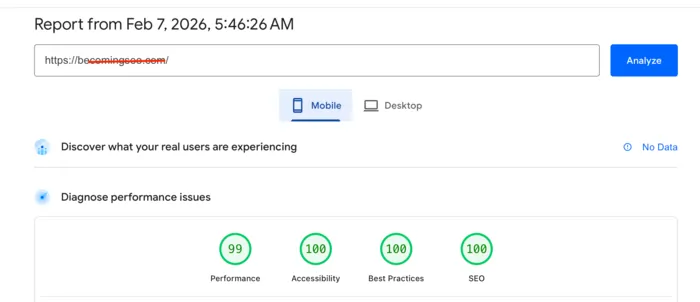
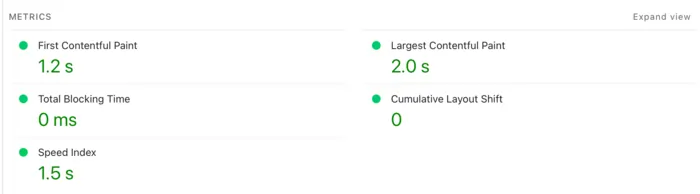
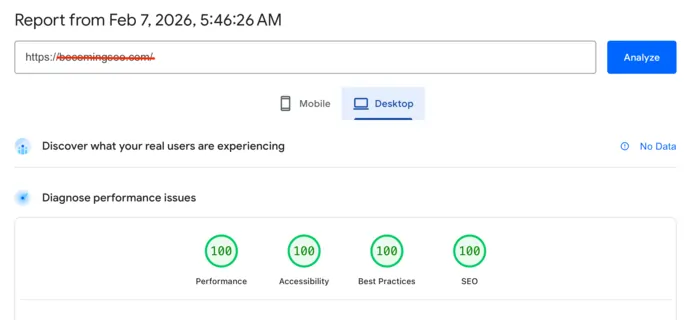
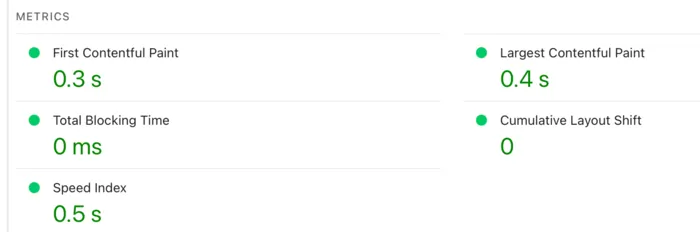
Here’s a real‑world result from one of my Elementor sites:
Proof: An Elementor site running on the Astra with proper caching. Green scores almost perfect, Performance 99% on Google PageSpeed Insights are absolutely possible with Elementor when you build and optimize correctly.
Yes, I design and develop becomingseo.com website personally.
Who I Am and Why You Should Listen

My name is Jin Grey, and I’ve been optimizing websites for around 18 years. My job has always been to take already built websites and make them faster, more efficient, and better for users and search engines.
Over the years I’ve worked with many web developers, different themes, and different page builders, and one thing is clear: tools are rarely the main problem—bad setups and bad habits are.
Now that I’m actively learning web development (HTML, CSS, a bit of JavaScript and PHP), I actually appreciate Elementor more. I can see how much work it does behind the scenes and how much time it saves.
For now, I don’t want to trade Elementor for anything else in the WordPress ecosystem, although I’m always open to trying new tools when they make sense.

Why So Many People Say “Elementor Is Bad”
If you spend any time in WordPress groups, you’ll see the same complaints:
- “Elementor is bloated and heavy.”
- “Elementor kills your Core Web Vitals.”
- “Elementor is bad for SEO.”
There is some truth behind these statements. Elementor does add extra CSS and JavaScript compared to the native Gutenberg editor, and it’s easy to create big, complex layouts that are heavier than they need to be.
If you stack too many widgets, use heavy templates, and install multiple Elementor add‑ons, your DOM and requests can grow quickly and slow the site down.
But “tool = bad” is the wrong conclusion. What I see, both in my work and in many real projects, is this: Elementor plus bad SEO, bad hosting, and zero optimization is a problem; Elementor plus good practices is usually fine and often very productive.
My Real‑World Experience With Elementor
Me and my team have been using Elementor for a long time on different types of sites. And the reality is simple: we don’t have major problems with it.
Here’s what we consistently do on Elementor sites:
- Use decent WordPress hosting instead of the cheapest overloaded shared plan.
- Combine Elementor with a lightweight theme such as Hello Theme, Astra, or GeneratePress.
- Optimize images and use a good caching setup with tools like WP Rocket or W3 Total Cache.
- Keep plugins under control and avoid installing every Elementor add‑on pack we see.
Elementor actually helped me look like a “pro” in front of clients while I was still a beginner in design and development. Drag‑and‑drop, built‑in structure (sections, columns, containers), and ready‑made templates allowed me to ship good‑looking layouts quickly and focus on performance and SEO, where my real strength was.
But I’m also honest: if you use Elementor with no SEO knowledge, no performance habits, and you just connect it to a bunch of partner plugins, you will probably fail.
Because Elementor has a big ecosystem (forms, popups, marketing add‑ons, WooCommerce extensions, etc.), some issues come from those third‑party tools, not from Elementor itself. That’s why I never judge only the builder; I look at the full stack.
Jin’s Stack (What I Actually Use)
If you want to copy my results, here’s the stack I currently use on most Elementor builds:
- Theme: Hello Elementor Theme
- Hosting: A fast, SSD‑based host with built‑in caching (for example, good LiteSpeed‑based hosting or a performance‑focused provider like Rocket‑style managed hosting)
- Page Builder: Elementor Pro
- Caching & Performance:
- WP Rocket for caching, file optimization, and delaying JS, or
- LiteSpeed Cache if the server supports it
- Meteor
- WP Optimizer
- Image Optimization / WebP:
- ShortPixel Adaptive Images or
- Elementor’s own WebP/image optimization workflow
- Extra Tweaks:
- Lightweight global fonts (often system fonts)
- Minimal animations
- Only essential Elementor add‑ons, no plugin overload
You can literally copy this setup and then adjust it slightly to fit your hosting and budget. Also, much better if you contact me.
Is Elementor Good for Beginners?
From what I’ve seen, yes—Elementor is excellent for beginners who want visual control and flexibility without touching code.
You get:
- A visual drag‑and‑drop editor with live preview, so you see your design as you build it.
- A powerful free version that’s enough for simple business sites and landing pages.
- Elementor Pro, which adds Theme Builder, forms, popups, WooCommerce templates, and more advanced widgets for serious projects.
- A huge library of templates, blocks, and full site kits in the Elementor Template Library that help you launch fast.
If you’re a visual person, Elementor feels natural: drag sections, adjust spacing, change typography, and see it instantly. For many beginners, this is the difference between “never launching” and actually having a website online.
The Part Nobody Wants to Hear: You Still Need SEO and Performance Basics
Elementor is not magic. It can make you look like a pro, but it cannot think like a pro for you. If you don’t know SEO and don’t know how to optimize, Elementor will happily let you build a slow, messy site.
Some essentials every Elementor user should learn:
- On‑page SEO fundamentals
- Clean heading structure (one H1 per page, logical H2/H3).
- Good meta titles and descriptions.
- Clear internal linking and helpful, readable content.
- Performance and speed basics
- Compress and resize images before upload.
- Use caching and, when useful, a CDN.
- Turn off unused widgets and avoid heavy animations.
- Plugin and add‑on discipline
- Don’t install five different Elementor add‑on packs for one feature.
- Stick to a small, trusted set of plugins that you really need.
- Using SEO plugins with Elementor
If you follow these basics, Elementor becomes a strong partner instead of a problem.
What Other Users and Reviews Are Saying
I don’t just rely on my own experience; I also pay attention to how others feel about Elementor.
Common positives:
- Very beginner‑friendly, with an interface that’s easy to learn.
- Huge flexibility and design control compared to the default editor.
- Massive ecosystem of templates, add‑ons, and tutorials, including the official Elementor Academy.
Common negatives:
- Heavier than bare‑bones Gutenberg or some lighter builders, especially if misused.
- Interface can feel overwhelming at first because there are so many options.
- Subscription pricing and support quality are frequent complaints from some users.
Most balanced reviews end up at the same conclusion I do: Elementor is great for beginners and non‑coders who are willing to respect basic SEO and performance principles.
Final Thoughts From Jin Grey
Elementor made me a so‑called “pro” long before I felt like a real web developer. It gave me the tools to design, while my experience in SEO and speed optimization made sure those designs actually worked in the real world.
If you treat Elementor like magic and ignore SEO and optimization, you’ll likely blame the tool for your own mistakes. If you treat it as a powerful builder that still needs a smart pilot—someone who understands performance, structure, and content—it can be one of the best ways to build WordPress sites today, especially as a beginner stepping into the pro world.







