

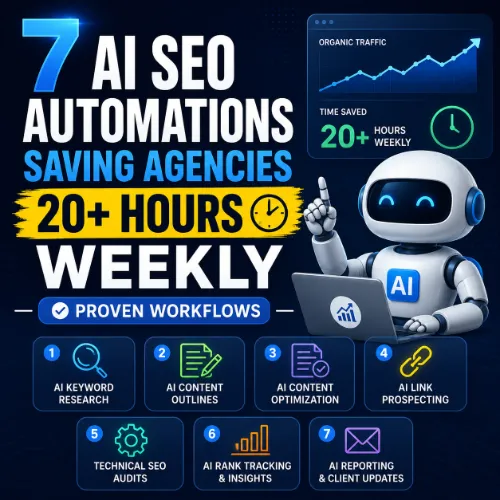
AI SEO automations Key Takeaways
If you’re spending hours on keyword research, content briefs, or technical audits, you’re leaving money on the table.
- AI SEO automations handle repetitive data-gathering tasks, letting you focus on high-value strategy and client communication.
- Seven proven workflows cover everything from keyword clustering to content generation, site audits, and reporting.
- Each automation pays for itself in hours saved, making it easier to scale your agency without hiring more people.
Why Every Agency Needs AI SEO Automations for Survival
SEO agencies face a paradox: clients demand faster results and more transparency, yet the scope of what “good SEO” includes keeps expanding. Manual work simply doesn’t scale. By implementing AI SEO automations, you eliminate tedious, rule-based tasks — like checking for broken links or pulling competitor keywords — that eat into your best thinking hours. For a related guide, see How SEO Professionals Use Google Cloud for Data Driven Optimization.
According to a recent SEMrush survey, SEO professionals spend 40% of their time on data collection and analysis alone. That’s nearly two full days per week spent not doing the work that actually moves rankings. Automation turns that on its head.
Below are seven field-tested automations that top-performing agencies use to consistently save more than 20 hours weekly. Each one comes with a clear value proposition and step-by-step explanation so you can implement them immediately.
7 AI SEO Automations That Deliver 20+ Hours Back
1. Automated Keyword Clustering and Mapping
Time saved: 6 hours per week.
What it does: Manually grouping hundreds of keywords by search intent, topic, and funnel stage is mind-numbing. Tools like Keyword Insights or WriterZen now use AI to cluster keywords automatically. You upload a CSV of target terms, and the tool groups them into topical silos, recommends a pillar page, and suggests semantically related secondary keywords.
How to do it: Export your keyword list from Ahrefs or Semrush into the clustering tool. Set the “search intent” filter to match your campaign goals (informational, commercial, transactional). The AI will produce a map with parent topics and sub-topic clusters in under 10 minutes. From there, you can assign clusters to writers or create content briefs instantly.
2. AI-Powered Content Brief Generation
Time saved: 4 hours per week.
What it does: Writing a thorough content brief that includes target keywords, competitor insights, recommended headings, and entity lists used to take 45 minutes per piece. Tools like Frase and Clearscope generate a data-rich brief from a single URL or keyword. The AI analyzes the top 10 search results, extracts common questions, entities, and keyword frequency, then outputs a structured outline. For a related guide, see How Vibe Coding Improves AI Content and Automation Workflows.
How to do it: Enter your target keyword into Frase. The tool pulls the SERP features, including People Also Ask questions and featured snippets. Review the AI-generated headline suggestions and outline. Export the brief with word count targets and readability grade. Give it to your writer — the research is already done.
3. Automated Internal Link Suggestions
Time saved: 2 hours per week.
What it does: Manually mapping internal links across a large site is tedious and error-prone. Tools like Link Whisper and InLinks use AI to scan your content library, identify orphan pages, and suggest contextually relevant internal links based on keyword overlap and topic similarity.
How to do it: Install the plugin (for WordPress sites) and run a full site scan. Review the suggested links — the tool will highlight anchor text, destination URL, and relevance score. Approve or reject with one click. The plugin adds the links automatically, ensuring your site’s link graph stays healthy without manual page-by-page editing.
4. Technical Site Audit with AI-Driven Prioritization
Time saved: 3 hours per week.
What it does: Running a full technical SEO audit manually is practically impossible for mid-sized sites. Tools like Sitebulb or Screaming Frog (paired with an AI layer like Lumar) crawl the entire website, detect issues (redirect chains, duplicate meta tags, slow-loading pages), and score each issue by impact. AI helps prioritize the fixes that actually matter for rankings versus trivial problems.
How to do it: Run a site crawl with Screaming Frog. Export the CSV of all unique issues and upload it to a spreadsheet with conditional formatting — or use Sitebulb’s built-in “audit report” feature, which automatically groups issues into “high priority,” “medium,” and “low.” Assign the high-priority tasks to your technical team. Track closure rates week over week.
5. Competitor Analysis and Gap Detection
Time saved: 3 hours per week.
What it does: Manually researching competitor domains for keyword gaps, backlink opportunities, and page-level performance is painstaking. Tools like Ahrefs and Semrush now offer automated competitor reports and content gap analyses. You input your domain and up to five competitors; the tool spits out a table of keywords that competitors rank for but you don’t.
How to do it: In Ahrefs, use the “Content Gap” tool. Enter your domain plus three competitor URLs. Set the filter to show only keywords with search volume above 100. The tool returns a ranked list of missed opportunities. Sort by keyword difficulty (KD) — target low-hanging fruit first. Build content targeting those keywords over the next month.
6. Automated Reporting and Dashboarding
Time saved: 4 hours per week.
What it does: Pulling data from multiple sources (Google Search Console, Google Analytics, rank trackers, backlink profiles) and formatting it into client-friendly reports is one of the biggest time drains for agencies. Tools like DataStudio (Looker Studio), AgencyAnalytics, and Graphite automate data aggregation and visual storytelling.
How to do it: Connect your data sources to a dashboard platform. Set up custom views for each client: organic traffic, keyword rankings, referring domains, and conversion metrics. Use AI insights modules that auto-write summary commentary (e.g., “Organic traffic increased 12% this month driven by 5 new ranking keywords in the transactional category”). Schedule automated weekly email delivery. Your clients get a polished report; you get four hours back.
7. AI-Generated Meta Titles, Descriptions, and Schema
Time saved: 2 hours per week.
What it does: Writing unique, click-worthy meta descriptions and title tags for dozens of pages is exhausting. Tools like NeuronWriter and RankIQ use AI to generate multiple options based on the page content and SERP analysis. The same tools can automatically produce FAQ schema in JSON-LD format.
How to do it: Use a plugin like RankMath or Yoast that integrates with AI-based meta generators. Alternatively, copy your page content into NeuronWriter; it will output 5–10 meta title variations. Select the best one, apply it to the page, and copy the generated schema markup into the page header. Automatically update meta for new blog posts as they publish.
SEO Entities and Their Functions
Understanding the data your automation tools process is essential for getting accurate results. Here’s a quick guide to the main entities these workflows interact with: For a related guide, see Build SEO Automation Tools Using Vibe Coding Workflows (Proven).
- Website / Domain entities — root domain, subdomain, and URL-level analysis help you identify whether performance belongs to the whole site, a section like blog.example.com, or a single page such as example.com/page.
- Keyword entities — organic keywords, keyword difficulty (KD), search volume, CPC, traffic potential, and SERP features show demand, competition, paid value, ranking opportunity, and result-type requirements.
- Backlink entities — referring domains, referring pages, anchor text, dofollow/nofollow links, broken backlinks, and new/lost backlinks explain authority, link quality, link risk, and outreach priorities.
- Page entities — top pages, best by links, best by traffic, broken pages, and internal pages reveal which URLs earn visibility, links, traffic, or need repair.
- Content entities — articles, authors, topics, published dates, social shares, and referring domains to content help evaluate editorial quality, freshness, authorship, engagement, and link attraction.
- SERP entities — featured snippets, People Also Ask, sitelinks, AI Overviews, video results, and local packs show what content format and answer structure the search result rewards.
- Technical SEO entities — crawl issues, redirect chains, canonicals, duplicate content, Core Web Vitals, and indexability status expose obstacles that prevent crawling, ranking, or a good page experience.
- Competitor entities — competing domains, content gap opportunities, link intersect domains, shared keywords, and competing pages show where rivals win traffic and where your site can catch up.
- Metrics entities — DR (Domain Rating), UR (URL Rating), traffic value, organic traffic, and referring domains count summarize authority, URL strength, market value, and search visibility.
Useful Resources
- Ahrefs Content Gap Analysis Guide — Learn step-by-step how to find and exploit keyword gaps against competitors.
- Semrush SEO Automation Strategies — Explore more automation workflows tailored for agencies.
Frequently Asked Questions About AI SEO Automations
AI SEO automations are no longer optional for agencies that want to stay competitive. Start with one workflow this week, measure the time savings, and then expand. Your future self — and your clients — will thank you.
Frequently Asked Questions About AI SEO automations
How much time can agencies actually save with AI SEO automations ?
Most agencies report saving 20–30 hours per week after fully implementing the seven automations described in this article.
What’s the easiest AI SEO automation to start with?
Start with automated reporting. It’s low-risk, fast to set up, and immediately frees up several hours each week.
Do AI SEO tools work with WordPress?
Yes, the majority of AI SEO tools offer WordPress plugins or integrations that simplify implementation.
Are these automations expensive for small agencies?
Many tools offer tiered pricing starting at $30–$50 per month. The time savings more than justify the cost for most agencies.
Can AI replace human SEO strategists?
No. AI automations handle repetitive tasks but can’t replicate strategic judgment, creative thinking, or client relationship management.
How do I choose the right AI SEO automation tool?
Evaluate your agency’s biggest time drains first, then trial tools that directly address those pain points. Most offer free trials.
What’s the ROI of implementing AI SEO automations ?
Typical ROI includes 20+ hours saved weekly, faster client reporting, reduced employee burnout, and the ability to take on more accounts without hiring.
Do AI SEO tools require any coding skills?
Not for most automations. Modern tools are designed for marketers, not developers. Basic technical SEO knowledge is helpful but not required.
How do I ensure AI-generated content doesn’t get penalized?
Always review and edit AI output. Use it as a starting point, not a final product. Ensure your content adds unique value beyond what’s already ranking.
What’s the best tool for automated internal linking?
Link Whisper is the most user-friendly for WordPress sites. InLinks is a solid choice if you also need entity-based topic modeling.
Can these automations help with local SEO?
Yes. Tools like BrightLocal and SEMrush have local SEO automation features for citation management, review monitoring, and local ranking tracking.
How often should I run a technical site audit?
Weekly for large sites (10,000+ pages) and bi-weekly for smaller sites. Use an automated crawler that alerts you to new errors as they happen.
What’s the biggest mistake agencies make with SEO automations?
Over-automating strategic decisions. Use automation to collect data, not to set strategy. Human judgment is still essential for interpreting results.
How do I train my team to use these tools?
Start with a single automation (e.g., reporting) for one client. Create a standard operating procedure document. Then expand to other automations and clients.
Is it safe to grant AI tools access to my clients’ data?
Reputable tools use encryption and comply with GDPR/CCPA. Always read their privacy policy and data processing agreement before connecting client accounts.
Can I automate backlink outreach?
AI can help identify prospects and even draft email templates, but personalized outreach still requires a human touch for best results.
Do AI SEO automations work for all industries?
Yes, the core workflows (keyword clustering, briefing, auditing, reporting) apply to any niche, from e-commerce to B2B SaaS.
What is the best way to measure the impact of automation?
Track two metrics: hours saved per week (use a time-tracking tool) and client satisfaction scores. Both should improve within the first month.
How do I present the value of automation to a skeptical client?
Share a before-and-after comparison: show the old report format vs. the new automated dashboard. Clients often appreciate the increased clarity and timeliness.
What’s next for AI SEO automations ?
We’re moving toward predictive SEO — AI that forecasts ranking changes based on competitor activity and Google algorithm updates, then suggests proactive content shifts.







