

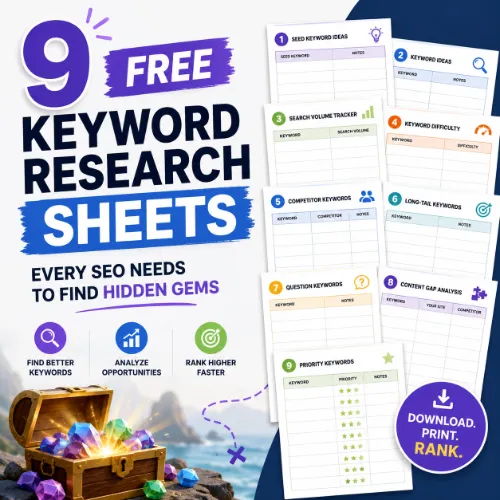
free keyword research sheets Key Takeaways
Keyword research is the foundation of any strong SEO strategy, but premium tools can be expensive.
- Learn how to use free keyword research sheets to uncover low-competition opportunities that competitors overlook.
- Each sheet includes step-by-step instructions and real-world examples so you can start researching immediately.
- Combine multiple sheets for a complete keyword strategy that covers search volume, difficulty, and SERP features.
Why every SEO needs free keyword research sheets
Even with powerful tools like Ahrefs or Semrush, raw data is useless without a system. Free keyword research sheets organize your ideas, track metrics, and reveal patterns that a spreadsheet of numbers hides. They also help you document your process, share findings with clients, and revisit research months later without starting from scratch. For a related guide, see 11 AI SEO Workflows Replacing Manual Keyword Research (Smart Guide).
Whether you are a freelance consultant, an in-house marketer, or a beginner building your first site, these templates will save hours of manual work. Let us walk through each sheet, explain its function, and show you how to adapt it to your niche.
1. Seed keyword brainstorming sheet
How it works
Start with the core topics your business covers. This sheet prompts you to list products, services, problems, and synonyms. For example, if you run a vegan bakery, seeds might include “vegan cake,” “dairy-free pastry,” and “plant-based dessert.”
Usage tip
Set a timer for 15 minutes and write down every term that comes to mind. Do not filter for volume yet. Later, you will feed these seeds into keyword tools to generate hundreds of related queries.
2. Long-tail keyword expansion sheet
How it works
Take one seed keyword and combine it with modifiers such as “best,” “near me,” “for beginners,” “cheap,” “review,” or “how to.” This sheet provides columns for each modifier and rows for your seeds.
Usage tip
Target long-tail phrases with low keyword difficulty. A phrase like “affordable vegan cake for birthday near me” has clear intent and often ranks faster than broad terms.
3. Competitor keyword gap sheet
How it works
List up to five competitors in the first column. Then write the keywords they rank for that you do not. Use tools like Google Search Console or Ubersuggest to find these gaps.
Usage tip
Focus on keywords where competitors rank in positions 4–10. Those pages have weaker authority, so you can outrank them with better content.
4. Search volume and trend tracker
How it works
This sheet includes columns for monthly search volume, trend direction (up/down), seasonality, and estimated traffic potential. You can pull volume data from Google Keyword Planner or Ahrefs free tools.
Usage tip
Filter for keywords with stable or growing volume. Avoid terms that spiked temporarily due to a news event unless your content is timely.
5. Keyword difficulty scoring sheet
How it works
Assign a score from 1–100 based on metrics like domain authority of top results, number of referring domains, and content length. This sheet includes a weighted formula you can adjust.
Usage tip
Target keywords with a difficulty score under 30 if your site is new. For established sites, you can aim for scores up to 50.
6. SERP feature analysis sheet
How it works
For each keyword, note whether the SERP shows a featured snippet, People Also Ask box, video results, or local pack. This sheet helps you decide which content format to create.
Usage tip
If a snippet exists, structure your content with a direct answer and bullet points. If video results dominate, consider creating a YouTube tutorial first.
7. Content cluster mapping sheet
How it works
Group keywords into pillar topics and supporting subtopics. For example, “vegan cake” becomes the pillar; “best vegan chocolate cake recipe,” “vegan cake delivery,” and “how to make vegan cake fluffy” are cluster topics.
Usage tip
Link your pillar page to each cluster article using descriptive anchor text. This signals topical authority to search engines.
8. Keyword-to-URL assignment sheet
How it works
Map every target keyword to an existing or planned URL. Columns include current ranking, recommended page type (blog, product, category), and priority level.
Usage tip
Avoid keyword cannibalization. If two keywords map to the same URL, consider merging them into one comprehensive guide.
9. Monthly tracking and reporting sheet
How it works
Track ranking changes, estimated clicks, impressions, and traffic month over month. This sheet includes a dashboard view with conditional formatting for green (up) and red (down).
Usage tip
Share this sheet with stakeholders. A quick glance shows which keywords are moving and which strategies need adjustment.
SEO entities and their functions
Understanding key SEO entities helps you interpret the data inside your free keyword research sheets and make smarter decisions. Here is how the most relevant entities function:
- Root domain vs. URL-level analysis: A root domain includes all subdomains and pages. URL-level analysis focuses on a single page. Use keywords mapped to specific URLs to identify which pages need optimization.
- Keyword difficulty (KD) and search volume: KD tells you how hard it is to rank. Volume shows demand. Balance both in your sheets to prioritize winnable opportunities.
- Referring domains and anchor text: The number of unique sites linking to a page affects its authority. Anchor text context helps you decide which link-building prospects to pursue.
- Top pages and broken pages: Top pages earn the most traffic or links. Broken pages lose value. Your tracking sheet should flag broken pages for immediate redirection.
- Featured snippets and People Also Ask: SERP features indicate what format the search engine rewards. Use this info in your SERP analysis sheet to shape content structure.
- Competing domains and content gaps: Competing domains are sites that rank for your target keywords. Content gaps show queries your competitors cover but you do not. Your gap analysis sheet will highlight these opportunities.
How to choose and combine these sheets
Start with the seed brainstorming sheet and long-tail expansion sheet to build your initial list. Then apply the competitor gap sheet to find overlooked angles. Use the volume tracker and difficulty scorer to filter for the best opportunities. Finally, assign each keyword to a URL using the keyword-to-URL sheet and track progress with the monthly reporting sheet.
Do not try to fill every sheet at once. Pick two or three that match your current bottleneck. If you struggle with content organization, start with the cluster mapping sheet. If you need client buy-in, prioritize the tracking and reporting sheet.
Conclusion: Start using free keyword research sheets today
Keyword research does not have to be expensive or overwhelming. These nine free keyword research sheets give you a structured, repeatable process for finding hidden gems that competitors miss. Download them, adapt them to your niche, and watch your organic traffic grow.
Pro tip: Revisit your sheets every quarter. Search trends shift, new competitors emerge, and your own content matures. Regular updates keep your strategy aligned with what users are searching for right now.
Useful Resources
For additional guidance on building keyword lists, check out Ahrefs’ guide to keyword research for beginners. It walks you through metrics like search volume, keyword difficulty, and traffic potential.
If you need a free tool to start gathering data, Ubersuggest offers keyword suggestions, volume estimates, and competitive analysis without a paid plan.
Frequently Asked Questions About free keyword research sheets
What are free keyword research sheets ?
They are spreadsheet templates that help you organize and analyze keyword data. They typically include columns for seed keywords, search volume, difficulty, SERP features, and tracking metrics.
Do I need to be good at Excel to use these sheets?
No. Most sheets use simple formulas and conditional formatting. You only need basic skills like filtering, sorting, and entering text. Google Sheets versions are also available.
Can I use these sheets for YouTube or Pinterest SEO?
Yes. The same principles apply. Just adjust the source of search volume data and consider platform-specific metrics like video views or pin saves.
How often should I update my keyword research sheets?
Review your master sheet once a quarter. Update search volumes, add new competitors, and remove keywords that no longer align with your content strategy.
Are free keyword research sheets enough for a full SEO strategy?
They are a strong foundation, but you still need a tool to pull accurate volume and difficulty data. Pair sheets with free tools like Google Keyword Planner or Ubersuggest. For a related guide, see 11 Ways AI Tools Like Google AI Studio Improve Keyword Research.
What is a seed keyword?
A seed keyword is a broad term that describes your core topic. For example, “vegan cake” is a seed. You expand it into hundreds of long-tail phrases using modifier columns.
How do I find competitor keywords for the gap sheet?
Use Google Search Console to see which queries bring traffic to competitor domains. Alternatively, paste competitor URLs into free tools like Ubersuggest or Ahrefs free backlink checker.
What is keyword difficulty?
Keyword difficulty (KD) is a score that estimates how hard it is to rank in the top 10 results. It is based on the authority and relevance of the pages currently ranking.
Should I target low-volume keywords?
Yes, if they have clear buyer intent and low competition. A keyword with 200 monthly searches that converts well can be more valuable than a high-volume term that attracts casual browsers.
How do I track keyword rankings with a sheet?
Check your ranking manually once a week or use a free rank tracker like Google Search Console. Log the position in your tracking sheet and color-code improvements.
What are SERP features?
SERP features are special result formats like featured snippets, People Also Ask boxes, local packs, and image carousels. They influence click-through rates and content strategy.
How do I use the content cluster mapping sheet?
List your pillar topic in the first column, then add supporting keywords in adjacent columns. Link each article back to the pillar page to build topical authority.
Can I share these sheets with my team?
Absolutely. Google Sheets makes collaboration easy. You can set permissions for editing or viewing and track changes over time.
What is the best free keyword research tool to pair with these sheets?
Google Keyword Planner is reliable for volume. Ubersuggest offers difficulty scores. AnswerThePublic helps with question-based keywords. Use one or combine all three.
How do I avoid keyword cannibalization?
Map each keyword to a unique URL in your assignment sheet. If two keywords target the same page, consider merging them into one comprehensive article.
Should I include branded keywords in my sheets?
Yes, if you want to track brand awareness. However, branded keywords often rank easily and may not require as much optimization as generic terms.
What is the difference between organic keywords and paid keywords?
Organic keywords refer to unpaid search results. Paid keywords trigger ads. Your free keyword research sheets should focus on organic keywords unless you run a PPC campaign.
How many keywords should I track per month?
Track 20–50 keywords per site in the beginning. As your content grows, prioritize the top 100 keywords that drive the most traffic or conversions.
Can I use these sheets for local SEO?
Yes. Add a column for city or region name. Use the local pack SERP feature analysis to decide if you need Google Business Profile optimization or local landing pages.
What should I do with keywords that have high volume but high difficulty?
Do not ignore them. Create high-quality, comprehensive content that targets the intent behind the query. Over time, as your domain authority grows, you may rank.







