

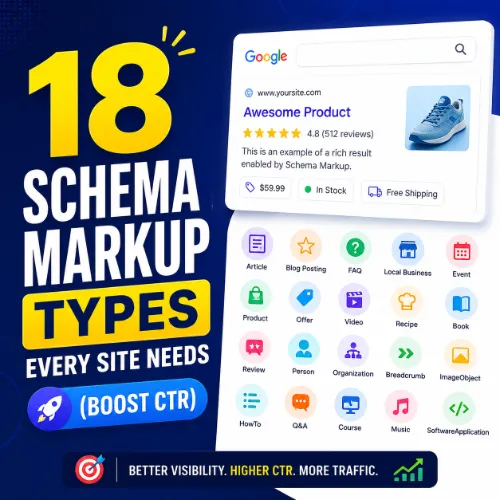
schema markup types Key Takeaways
Structured data helps search engines understand your content, leading to rich results like star ratings, FAQs, and product details.
- The right schema markup types help search engines display your content as rich snippets, increasing visibility and credibility.
- Applying schema correctly improves your chances of appearing in voice search, local packs, and knowledge panels.
- Focusing on schema for your specific content types — whether products, articles, or events — gives you the highest return for your SEO efforts.
Why the Right Schema Markup Types Matter for Your Site
Schema markup is a code you add to your website that helps search engines return more informative results for users. When you choose the right schema markup types, you give Google clear signals about what your content means. This can translate into rich results like product stars, recipe photos, event dates, and FAQ dropdowns — all of which catch the user’s eye and improve click-through rates.
Beyond clicks, schema also supports voice search and AI overviews, where concise, structured answers are favored. In short, schema is no longer optional for serious SEO; it’s a standard expectation for building trust and visibility.
18 Essential Schema Markup Types to Implement
Below are the 18 most valuable schema markup types for most websites, with a clear description, use case, and example for each.
1. Organization
Description: Represents your business as an entity, including name, logo, and contact info.
Use case: Every site should use this to establish brand identity and show up in knowledge panels.
Example: A bakery marks up its name, logo, address, and phone number so Google displays it in search results.
2. Local Business
Description: Extends Organization with location-specific details like hours and reviews.
Use case: Essential for brick-and-mortar stores, restaurants, and service areas to appear in local packs.
Example: A local dentist adds opening hours, holiday closures, and review ratings to attract nearby patients.
3. Product
Description: Details a product: name, price, availability, brand, and reviews.
Use case: E-commerce sites need this to display price, availability, and star ratings in search results.
Example: An online shoe store shows “$89.99 · In stock · 4.5 stars” directly on the SERP.
4. Article (NewsArticle / BlogPosting)
Description: Marks up news or blog content with headline, author, date, and image.
Use case: Publishers and content sites use it for top stories carousels and rich search results.
Example: A tech blog’s review of a smartphone appears with a large image, headline, and publish date.
5. FAQPage
Description: Marks up a list of questions and answers.
Use case: Perfect for adding an interactive FAQ section that expands right in search results.
Example: A home repair site’s “How to fix a leaky faucet” FAQ shows questions users can click to see answers.
6. HowTo
Description: Provides step-by-step instructions with optional images, tools, and time.
Use case: Great for tutorials, recipes, and DIY guides where steps are clear.
Example: A recipe site marks up ingredients and numbered steps so Google shows a step-by-step carousel.
7. Event
Description: Describes an event: name, date, location, and ticket info.
Use case: Useful for conferences, webinars, concerts, and local meetups to appear in event-rich results.
Example: A music festival adds start/end dates, venue, and ticket URLs directly on the SERP.
8. Review
Description: Represents a single review of an item, with rating and reviewer details.
Use case: Trustworthy for displaying review snippets under products, services, or local businesses.
Example: A software review site shows “5/5 stars – John D.” for a tool it tests.
9. Recipe
Description: Structured data for recipes: ingredients, cook time, calories, and ratings.
Use case: Food blogs and cooking sites gain rich snippets with photos, star ratings, and cook times.
Example: A pasta recipe shows “15 min prep · 4.7 stars · 350 calories” on the search results page.
10. VideoObject
Description: Marks up video content with title, description, thumbnail, duration, and upload date.
Use case: Essential for any page featuring a video, to appear in video carousels and rich snippets.
Example: A fitness channel’s “20-minute HIIT workout” shows a preview thumbnail and total duration.
11. BreadcrumbList
Description: Represents the page’s position within the site hierarchy (e.g., Home > Clothing > T-shirts).
Use case: Helps Google understand site structure and display breadcrumb trails in search results, improving navigation.
Example: A user searching “men’s running shoes” sees “Home > Shoes > Running Shoes” as a clickable path.
12. sitelinks search box
Description: Allows users to search within your site directly from search results.
Use case: Best for sites with a strong internal search feature, giving users quick access to deeper content.
Example: Amazon’s sitelinks search box appears under its homepage in Google, letting users search for products instantly.
13. Person
Description: Represents an individual, often an author, team member, or public figure.
Use case: Useful for author profiles, about pages, and websites built around personal branding.
Example: A freelance photographer marks up the “Person” schema to appear in knowledge panels with bio and photos.
14. Software Application
Description: Details a software app: name, operating system, price, and user ratings.
Use case: App stores, SaaS sites, and tool reviews can display ratings and pricing in search results.
Example: A project management tool’s landing page shows “4.5 stars · Free trial · Web, iOS, Android” on the SERP.
15. Book
Description: Structured data for books: title, author, ISBN, and format.
Use case: Book review sites, online bookstores, and author pages benefit from rich results with cover images and ratings.
Example: A literary blog marks up a novel with its ISBN, author name, and star rating, appearing as a rich result.
16. JobPosting
Description: Lists job openings with title, location, salary, and application URL.
Use case: Career pages and job boards use this to appear in Google’s job search module.
Example: A company’s careers page marks up “Software Engineer · $120K · Remote” to show up in job search results.
17. Course
Description: Details an educational course: title, provider, description, and duration.
Use case: Online learning platforms and educational institutions gain rich snippets in course search results.
Example: A coding academy marks up “Python for Beginners – 4 weeks – $49” appearing with course details.
18. MedicalCondition (and other health schemas)
Description: Describes a medical condition, symptom, or treatment with scientifically verified information.
Use case: Health websites, medical blogs, and patient portals can display symptom checkers and treatment options with authority.
Example: A health site marks up “Type 2 Diabetes” with symptoms, causes, and treatment steps, appearing as an authoritative answer.
Best Practices for Implementing Schema Markup Types
Choosing the right schema markup types is only half the battle. You must implement them correctly to avoid errors and maximize impact.
Use JSON-LD
Google recommends JSON-LD format because it’s easy to maintain and doesn’t interfere with page HTML. Place the structured data block in the
section of your page.Validate Your Markup
Always test your schema using Google’s Rich Results Test or the Schema Markup Validator. Fix any warnings or errors before publishing. For a related guide, see Using Vibe Coding to Generate Schema Markup and Structured Data.
Match Schema to Content
Never use schema that doesn’t match your visible content. For example, don’t add “Product” schema to a general informational page just to get star ratings. This can lead to manual actions.
Keep It Updated
If your product prices, event dates, or business hours change, update your schema accordingly. Outdated structured data can hurt user trust and search performance. For a related guide, see The Complete Guide to AI FAQ Schema for SEO.
Common Mistakes to Avoid
- Over-marking up: Adding too many schema types on one page can confuse search engines. Focus on the primary content type.
- Mismatched data: Ensure the content on your page matches the schema markup exactly. For example, if you mark up an article, the headline and author must be visible on the page.
- Ignoring guidelines: Each schema type has specific property requirements. Review the official schema.org documentation before implementing.
- Not testing across devices: Rich results may appear differently on mobile and desktop. Always test on both.
SEO Entities and Their Functions
When you implement schema markup types, several entities help analyze and improve your SEO performance:
- Website / Domain entities: Root domain, subdomain, and URL-level analysis show whether performance belongs to the whole site, a section like blog.example.com, or a single page such as example.com/page.
- Keyword entities: Organic keywords, keyword difficulty (KD), search volume, and SERP features reveal demand and competition for your target queries.
- Page entities: Top pages, best by links, and broken pages reveal which URLs earn visibility, links, or need repair.
- SERP entities: Featured snippets, People Also Ask, and sitelinks show what content format the search result rewards.
- Technical SEO entities: Crawl issues, canonicals, and Core Web Vitals expose obstacles that prevent ranking or a good page experience.
Useful Resources
For further reading on structured data, visit the official Schema.org documentation for a complete list of all types and properties. For practical implementation guidance, Google’s Search Gallery shows how different schemas appear in search results.
schema markup types are not just a technical SEO checklist item — they are a direct bridge between your content and how users discover it. Start with the most relevant types for your site, validate everything, and update as your business evolves. That’s the smart way to earn better visibility and trust. For a related guide, see Schema Markup Explained: How to Improve Search Visibility.
Frequently Asked Questions About schema markup types
What is the most important schema markup type for SEO?
The Organization schema is the most fundamental because it establishes your brand identity and enables knowledge panels. For most sites, pairing it with the most relevant type (Product, Article, LocalBusiness, or Recipe) covers the basics.
Can I use multiple schema types on one page?
Yes, you can use multiple schema types on a single page, as long as they are relevant to the content. For example, a product page might use both Product and Review schemas. Use JSON-LD with @graph to combine them cleanly.
Does schema markup guarantee rich results?
No, schema markup is a signal, not a guarantee. Google decides whether to display rich results based on relevance, quality, and user intent. However, using correct schema significantly increases your chances.
How do I test if my schema markup is working?
Use Google’s Rich Results Test or the Schema Markup Validator. Enter your page URL or code snippet, and the tool will show any errors, warnings, and which rich results are eligible.
What is the difference between JSON-LD, Microdata, and RDFa?
JSON-LD is a script block placed in the
or, separate from visible HTML. Microdata and RDFa are inline formats added directly to HTML tags. Google recommends JSON-LD because it’s easier to maintain and less likely to break.Do I need schema for every page?
Not every page, but every page with valuable content should have relevant schema. For example, contact pages benefit from LocalBusiness, while about pages benefit from Organization or Person schema. Prioritize pages that drive traffic and conversions.
How long does it take for schema to affect rankings?
Schema itself is not a direct ranking factor, but rich results can improve CTR, which may indirectly boost rankings. You may see changes in appearance within days to weeks after correct implementation and indexing.
Can I use the same schema on mobile and desktop?
Yes, schema works the same on all devices. However, the display of rich results (e.g., carousels, star ratings) can vary between mobile and desktop. Always test on both to ensure consistency.
Is FAQ schema better than a plain text FAQ?
Yes, FAQ schema can make your questions expandable directly in search results, which increases visibility and engagement. It’s especially useful for pages where FAQs are a core part of the content.
Can I add schema to a WordPress site without a plugin?
Yes, you can manually add JSON-LD code to your theme’s header.php or via a custom field. However, plugins like Yoast SEO, Rank Math, or Schema Pro make the process easier and reduce the risk of errors.
What happens if my schema markup has errors?
If errors are present, Google may ignore the markup entirely or display incomplete rich results. Fix errors as soon as you find them using the Rich Results Test tool.
Does schema markup work for voice search?
Yes, schema markup helps voice assistants like Google Assistant and Siri understand your content structure. FAQ and HowTo schemas are particularly useful for voice search because they provide direct, concise answers.
How often should I update schema markup?
Update schema whenever the underlying content changes — for example, when a product price, event date, or business hours change. Regular audits (e.g., quarterly) help keep your data accurate.
Can I use schema for affiliate links?
Yes, you can use Product schema for affiliate products, but you must accurately represent the product details (price, availability, etc.). Misleading schema can result in penalties.
What is the difference between Article and NewsArticle?
NewsArticle is a subtype of Article intended for time-sensitive news content. It has properties like dateline, printColumn, and location, which Google may use for Google News and Top Stories features.
Do I need a separate schema for each language version of a page?
Yes, you should add schema in the language of the page content. Use the “inLanguage” property to specify the language, and ensure the schema description, name, and other properties match that language.
Can I mark up user-generated content with schema?
Yes, for user-generated content like comments, you can use the “Comment” schema. For product reviews left by users, use the “Review” schema. Ensure the review content is authentic and not manipulated.
Does schema affect site speed?
JSON-LD schema has a negligible impact on site speed because it’s a small script block. Inline microdata or RDFa can slightly increase HTML size, but the difference is rarely significant.
Where can I learn more about schema markup?
Start with the official Schema.org documentation for type definitions and property requirements. Google’s Search Central website also provides practical guides and case studies for implementing structured data.
What is the future of schema markup in SEO?
As AI and voice search grow, schema will become even more critical for helping machines understand content. Expect more rich result types, tighter integration with AI overviews, and possibly expanded use in mobile search experiences.







