

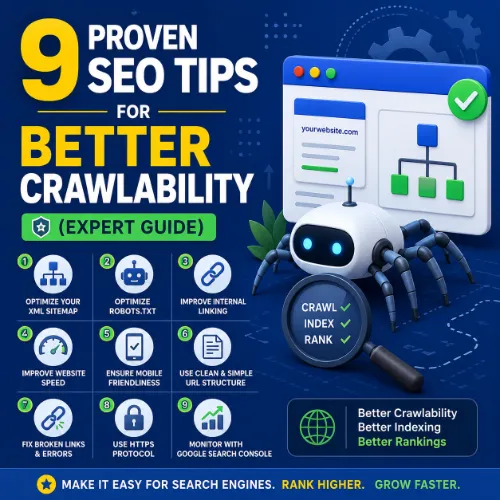
SEO tips for better crawlability Key Takeaways
Every day, search engine bots decide which pages to crawl, how deeply to explore your site, and which URLs to index.
- SEO tips for better crawlability help search engine bots discover, access, and index your most important pages efficiently.
- Common crawl blockers include misconfigured robots.txt, slow server response times, and orphan pages with no internal links.
- Regular technical audits using tools like Ahrefs or Google Search Console reveal crawl errors and indexation gaps that hurt organic visibility.
Why SEO Tips for Better Crawlability Matter in 2025
Every day, search engine bots decide which pages to crawl, how deeply to explore your site, and which URLs to index. If those bots encounter roadblocks — slow load times, broken links, or unclear site architecture — your content remains invisible. Improve website crawlability by removing these barriers, and you give every page a fair chance to earn organic traffic.
Crawlability directly affects crawl budget, especially on large sites. The more efficiently bots can move through your pages, the more of your valuable content gets indexed and ranked.
1. Audit Your Robots.txt File
Your robots.txt file tells bots which parts of your site to crawl or ignore. A single misconfigured directive can block an entire section of your site.
Best Practice Example
Use Google Search Console’s robots.txt tester to validate your file. A typical permission-friendly rule looks like this:
User-agent: *

Disallow: /admin/

Disallow: /tmp/
Never block CSS, JS, or image files, because that prevents Google from rendering your pages correctly.
2. Manage Crawl Budget by Prioritizing Key Pages
Crawl budget is the number of URLs Googlebot can and wants to crawl on your site within a given timeframe. To improve website crawlability, focus the bot’s attention on pages that drive conversions or traffic.
How to Prioritize
Use Google Search Console’s “Crawl Stats” report to see which pages Google crawls most often. Then review your internal link structure: high-value pages should receive more internal links from your homepage or top-level categories.
3. Fix Redirect Chains and Loops
When a URL redirects to another URL, which then redirects to a third page, bots waste time following the chain. Long redirect chains consume crawl budget and may cause important pages to be missed.
Actionable Fix
Run a site audit using a tool like Ahrefs Site Audit to detect redirect chains. Replace chain redirects with a single 301 redirect pointing directly to the final destination URL.
4. Use a Flat Site Architecture
Sites with deep hierarchies — where pages are buried four or five clicks from the homepage — are harder to crawl. A flat architecture means any page can be reached in three clicks or fewer.
Best Practice Example
Structure your site like:
Homepage → Category → Subcategory → Post
Then add breadcrumb navigation and a comprehensive XML sitemap to give bots multiple paths to every URL.
5. Submit and Maintain an Accurate XML Sitemap
Your XML sitemap is a direct signal to search engines about which pages you want indexed. Keep it updated and error-free.
Tips for Your SEO Crawlability Guide
- Include only canonical URLs — no duplicate or parameter-heavy links.
- Set the
<priority>tag to indicate relative importance (e.g., 0.8 for cornerstone content). - Resubmit your sitemap in Google Search Console every time you publish important new content.
6. Eliminate Orphan Pages
Orphan pages have no internal links pointing to them. Bots usually can’t find them unless they are in the sitemap, and even then, crawlers may skip them if they lack structural support.
Audit Strategy
Use the Internal pages report in Ahrefs (or a similar crawler) to identify URLs with zero internal links. Add contextual links from relevant existing pages to fill those gaps.
7. Optimize Server Response and Page Speed
Slow servers and bloated pages consume crawl budget. Googlebot will crawl fewer pages per session if your site responds slowly.
Key Metrics to Monitor
| Metric | Target Value | Why It Matters |
|---|---|---|
| TTFB (Time to First Byte) | < 200 ms | First step in crawlability; high TTFB reduces bot speed. |
| LCP (Largest Contentful Paint) | < 2.5 s | Core Web Vitals signal that influences ranking. |
| Server error rate (5xx) | < 1% | Frequent errors cause bots to abandon crawling. |
8. Handle Duplicate Content with Canonical Tags
When bots encounter multiple versions of the same page, they waste time deciding which one to index. Use the rel="canonical" tag to point all duplicates to a single preferred URL.
Real-World Example
An e-commerce site with product URLs that include ?color=red and ?size=large should set the canonical to the base product URL. This preserves crawl budget by preventing bot confusion.
9. Monitor and Fix Crawl Errors in Google Search Console
Even with perfect planning, crawl errors appear. Google Search Console’s “Crawl Errors” report flags server errors (5xx), soft 404s, and blocked URLs.
Actionable Step
Set up weekly email alerts for new crawl errors. Investigate each error and fix the root cause: remove or redirect dead links, unblock accidentally blocked pages, and correct DNS issues.
SEO Entities and Their Functions
Understanding the entities behind crawlability and ranking helps you diagnose issues more precisely. Below are key entities and what they reveal.
- Technical SEO entities such as crawl issues, redirect chains, and indexability status expose obstacles that prevent bots from accessing content.
- Website / Domain entities (root domain, subdomain) help identify whether a crawl problem affects the entire site or a specific subsection.
- Page entities (top pages, broken pages, internal links) show which URLs earn visibility and which need repairs.
- Metrics entities like organic traffic and referring domains count summarize authority and search visibility.
Useful Resources
Deepen your crawlability knowledge with these authoritative guides:
- Google’s official guide on crawl budget management — learn how Google allocates crawl resources across your site.
- Ahrefs: How to Monitor and Optimize Crawl Budget — practical steps to reduce wasted crawl traffic and focus on pages that matter.
Frequently Asked Questions About SEO tips for better crawlability
What is crawlability in SEO?
Crawlability refers to a search engine’s ability to access and navigate a website’s pages via links. Good crawlability ensures bots can find all your important content.
How do I check if my site is crawlable?
Use Google Search Console’s “URL Inspection” tool. Enter a URL, and it will tell you whether Google can crawl and index it, along with any errors.
What is a crawl budget and why does it matter?
Crawl budget is the number of URLs Googlebot will crawl on your site within a given timeframe. If your budget is wasted on low-value pages, important pages may go unindexed.
Can robots.txt hurt crawlability?
Yes. A misconfigured robots.txt file can block important pages or entire sections. Always test changes before publishing.
What’s the difference between crawlability and indexability?
Crawlability is about bots accessing a page. Indexability means the page can be stored in the search engine’s index. A page can be crawlable but not indexable (e.g., blocked by a noindex tag).
How does site speed affect crawlability?
Slow server response times force Googlebot to wait longer, reducing the number of pages it can crawl per session. Faster sites get better crawl coverage. For a related guide, see How to Write Better Prompts for Vibe Coding Projects.
What is a redirect chain and why is it bad?
A redirect chain occurs when URL A redirects to B, B to C, and so on. Each hop consumes crawl budget and delays bot access to the final page.
Should I use nofollow on internal links?
Generally no. Nofollow internal links tell bots not to follow the link, which can prevent deep pages from being crawled. Use them sparingly, if at all.
How often should I update my XML sitemap?
Update it whenever you publish new content or remove old URLs. At a minimum, review it monthly and resubmit after major site changes.
Can orphan pages be indexed?
They can if they appear in your XML sitemap, but they are less likely to be crawled deeply. Adding internal links improves their crawl priority.
What are soft 404s and how do they hurt crawlability?
A soft 404 is a page that displays a “not found” message but returns a 200 status code. Bots may waste time trying to crawl such pages instead of skipping them.
Does pagination affect crawlability?
Yes. Paginated series without proper rel=”prev/next” tags or infinite scroll without proper <meta> tags can confuse bots. Use clear navigation and canonical tags for multi-part pages.
What’s the best internal link structure for crawlability?
Use a flat hierarchy: every page should be reachable within 3–4 clicks from the homepage. Add contextual links from related content to reinforce structural paths. For a related guide, see 8 Essential Content Auditing Tools Every SEO Should Try.
How do JavaScript frameworks affect crawlability?
Google can render JavaScript, but heavy JS dependencies may slow rendering and cause partial crawling. Use server-side rendering or dynamic rendering for complex apps.
What is a crawl error in Google Search Console?
A crawl error occurs when Googlebot fails to access a URL due to server issues, DNS problems, or timeouts. You can view and fix these in the “Crawl Errors” report.
Should I block search result pages from crawlers?
Yes. Internal search result pages often create duplicate, low-value content. Block them in robots.txt or add a noindex tag to conserve crawl budget.
How does HTTPS affect crawlability?
Google prefers secure HTTPS sites. An HTTP-only site may be crawled less frequently or cause warnings. A clean HTTPS migration with proper redirects maintains crawlability.
What is a normal crawl rate for a small website?
For a small site (under 500 pages), Google may crawl 50–200 URLs per day. This can increase as the site gains authority and content freshness.
Can duplicate content cause crawl problems?
Yes. Duplicate content wastes crawl budget and confuses bots. Use canonical tags to consolidate signals and guide crawlers to the preferred version.
Do social shares affect crawlability?
Not directly, but popular content may get crawled more often because Google detects fresh links and engagement signals that suggest importance.







